
Creating menus
A menu is a Lua table with a header and a list of items. You register it once, then open it by id. The definition, callbacks, permissions and the back stack stay in Lua. The web only gets a serialized copy without functions.
Register and open
exports.np_menu:register({
  id = 'mechanic',                    -- required, unique
  title = 'Mechanic', subtitle = 'LS Customs', icon = 'wrench', tint = 'orange',
  items = {
    { type = 'button', label = 'Repair vehicle', icon = 'screwdriver-wrench',
      onSelect = function(item, menu) print('repair') end },
    { type = 'submenu', label = 'Parts', icon = 'gears', menu = 'mechanic_parts' },
  },
})

exports.np_menu:open('mechanic')
Registering an id again replaces the definition and re-renders it if it's visible. open(id, { selectedId = 'rowId' }) selects a row on open. open(id, { keepStack = true }) pushes the menu on top of the open one, so Backspace goes back to it (or, if id is already in the stack, pops back down to it).
Menu fields
| Field | Default | Description |
|---|---|---|
id | Required. Unique menu id | |
title, subtitle | Header text. The subtitle is shown in capitals | |
icon, tint | Header tile. Icons are Font Awesome 6 solid names without fa-. Tints: neutral, red, orange, rust, pink, olive, lilac, green, blue, aqua, brand | |
layout | 'list' | 'list' or 'grid' (phone home-screen pages with a dock) |
position | player setting | 'right', 'left' or 'center' |
skin | 'default' | 'staff' uses the red-edged danger glass for admin tools |
search | true for lists | Type-to-filter row (/ or Tab focuses it) |
searchDeep | false | Also search items of submenus registered with menu = 'id' (not build). Results show their breadcrumb |
counter | true for lists | The 4 / 14 position tag |
canClose | true | false: Backspace on the root and the close button do nothing |
dock | Grid only: items shown in the dock. Pinned items are appended | |
preview, cart | Preview card and cart | |
tag | { icon, label } meta tag in the header (the quick menu shows the clock) | |
allowDead | false | Keep the menu open (and allow opening it) while the player is dead |
onOpen(menu) | After the menu is shown | |
onClose(menu, reason) | For every menu in the stack when it closes. reason: 'api', 'back', 'select', 'user', 'replaced', 'removed', 'death', 'server', 'stop', … | |
onBack(menu) | When this level is popped with Backspace | |
onFocus(item, menu) | The selection moved to item | |
onCart(menu) | The cart button was pressed | |
items | {} | Rows, see below |
Item fields (all types)
| Field | Description |
|---|---|
id | Optional, unique per menu. Missing ids become i1, i2, … Give rows an id if you want to update them later |
type | One of the item types. Defaults to submenu when menu / build is set, else button |
label, sublabel | Row text and the small second line |
description | Shown in the description card while the row is selected. **bold** is supported |
icon, tint | Row tile. Colour means something: green confirm, red destructive, orange warning, blue police… |
keywords | Extra search terms |
disabled, disabledReason | Greyed out. Disabled rows stay selectable so the reason is visible; Enter plays the error sound |
loading | Spinner instead of the control. Set automatically while a server action runs |
badge | Number, short string, or true for a dot |
cooldown | ms, or { remaining = ms, total = ms }. Shows a countdown bar; the row can't be used until it ends |
visible | false or a function (item, menu) -> bool to hide the row |
ace, groups, jobs, canInteract, showLocked | Permissions, see below |
onSelect(item, menu, value) | Enter on the row. Return false to cancel the close / server action that would follow |
onChange(value, item, menu) | The value changed. Return false to revert it |
onFocus(item, menu) | The row was selected |
server, args, onResult | Call a server action after onSelect / onChange |
confirm | true or { title, message, confirmLabel, cancelLabel, hold, timeout }: ask first |
close | true: close the whole menu after onSelect |
Callbacks run in a thread, so they can block: open a dialog, call the server, Wait.
The OOP wrapper
Add the wrapper to your resource's fxmanifest.lua:
shared_script '@np_menu/import.lua'It defines a global NpMenu table in your resource:
local m = NpMenu.create({ id = 'dev_tools', title = 'Tools', icon = 'code', tint = 'orange' })

m:add({ type = 'switch', id = 'god', label = 'Godmode', icon = 'shield-halved',
  onChange = function(on) SetEntityInvincible(PlayerPedId(), on) end })
m:add({ type = 'button', id = 'tp', label = 'Teleport to waypoint', icon = 'location-dot' }, 1) -- insert at index 1

m:open()
m:update('god', { checked = true })        -- patch one row
m:update({ subtitle = 'Updated' })        -- patch the header
m:remove('tp')                            -- remove a row; m:remove() unregisters the menu
m:close()| Method | Maps to |
|---|---|
NpMenu.create(def) | register(def), returns the object (or nil) |
m:add(item, index?) | addItem |
m:set(items) | setItems |
m:update(itemId, patch) / m:update(patch) | updateItem / update |
m:remove(itemId?) | removeItem / remove |
m:get(itemId) | getItem (serialized copy) |
m:open(opts?), m:close(reason?), m:isOpen() | open, close (only if this menu is in the stack), inStack |
m:preview(card), m:cart(cart) | setPreview, setCart |
The wrapper also forwards NpMenu.inputDialog, confirm, notify, addRadial, removeRadial, showContext, closeContext, openRadial, closeRadial, callServer and getSettings. On the server it provides NpMenu.registerAction(name, opts) and NpMenu.notify(src, data).
Examples per item type
See Item types for every field.
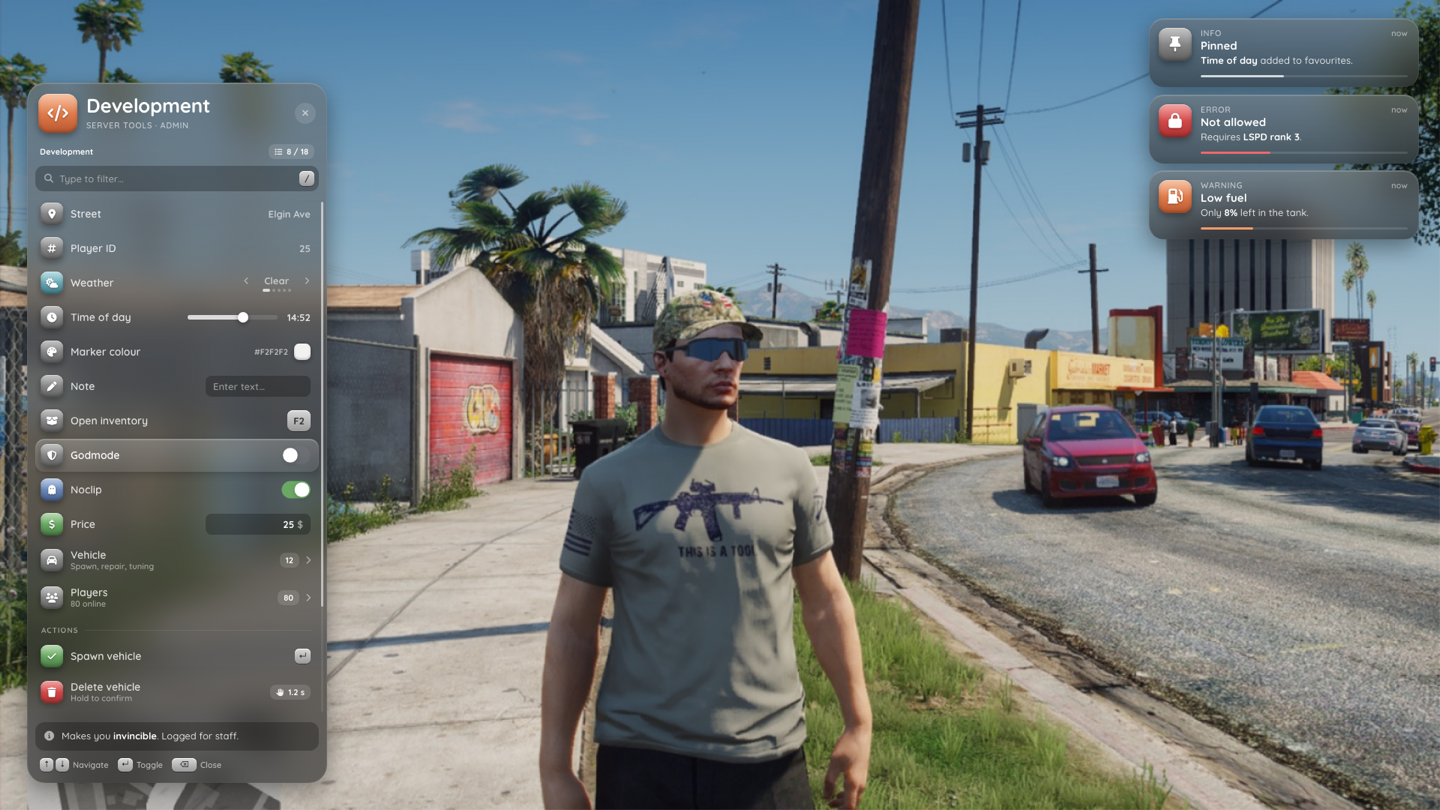
items = {
  { type = 'section', label = 'Actions' },
  { type = 'button', label = 'Open inventory', icon = 'box-open', key = 'F2', rightLabel = 'Tab' },
  { type = 'action', variant = 'confirm', label = 'Spawn vehicle', icon = 'check', tint = 'green',
    onSelect = function() spawn() end },
  { type = 'action', variant = 'danger', hold = 1200, label = 'Delete vehicle', sublabel = 'Hold to confirm',
    icon = 'trash', tint = 'red', onSelect = function() deleteVehicle() end },
  { type = 'action', variant = 'warning', label = 'Kick', icon = 'door-open', tint = 'orange',
    confirm = { title = 'Kick player?', message = 'They will be **disconnected**.' } },
  { type = 'separator' },

  { type = 'section', label = 'Values' },
  { type = 'info', label = 'Street', icon = 'location-dot', value = 'Elgin Ave' },
  { type = 'number', label = 'Amount', icon = 'hashtag', value = 1, min = 1, max = 50, step = 1, bigStep = 10 },
  { type = 'list', label = 'Weather', icon = 'cloud-sun', options = { 'Clear', 'Rain', { label = 'Thunder', value = 'THUNDER' } },
    index = 1, onChange = function(index, item) print(item.options[index]) end },
  { type = 'slider', label = 'Time of day', icon = 'clock', min = 0, max = 1439, step = 1, bigStep = 15, value = 720,
    format = function(v) return ('%02d:%02d'):format(v // 60, v % 60) end },
  { type = 'color', label = 'Marker colour', icon = 'palette', value = '#F2F2F2', palette = { '#F2F2F2', '#E05A1E', '#2C4EA0' } },
  { type = 'input', label = 'Note', icon = 'pen', placeholder = 'Enter text…', maxLength = 64 },
  { type = 'input', inputType = 'money', label = 'Price', icon = 'dollar-sign', tint = 'green', value = 25, min = 0, unit = '$' },
  { type = 'keybind', label = 'Open inventory', icon = 'keyboard', value = 'F2' },

  { type = 'section', label = 'Toggles' },
  { type = 'switch', label = 'Noclip', icon = 'ghost', checked = false, onChange = function(on) setNoclip(on) end },
  { type = 'checkbox', label = 'Shirt', icon = 'shirt', checked = true },
  { type = 'radio', group = 'walk', label = 'Default', checked = true },
  { type = 'radio', group = 'walk', label = 'Gangster', onChange = function() setWalk('gangster') end },

  { type = 'submenu', label = 'Vehicle', sublabel = 'Spawn, repair, tuning', icon = 'car', count = 12, menu = 'dev_vehicle' },
  { type = 'link', label = 'Open phone', icon = 'mobile-screen', onSelect = function() ExecuteCommand('phone') end },
}- Values are stored back into the item, so reopening the menu shows the latest value.
format(value, item, menu)returns the text shown instead of the raw value. - Radio rows only fire
onChange(true)on the newly checked row. np_menu unchecks the rest of thegroupin that menu. - Links close the menu after
onSelectunlessclose = false.
Submenus
Point a submenu row at a registered menu, or build it when the player enters it:
-- 1. a registered menu (searchable with searchDeep)
{ type = 'submenu', label = 'Parts', menu = 'mechanic_parts' }

-- 2. built on enter: return an items array, or a full definition
{ type = 'submenu', label = 'Players', icon = 'users',
  build = function(childId, item, parent)
    local items = {}
    for _, id in ipairs(GetActivePlayers()) do
      items[#items + 1] = { type = 'button', label = GetPlayerName(id), icon = 'user' }
    end
    return items   -- or { title = 'Online', subtitle = '…', items = items }
  end }
A built submenu is registered as a temporary menu <parentId>/<itemId> and dropped when the player backs out. It inherits the parent's skin, position and search setting, and the row's label, icon and tint as its header.
Updating a menu
exports.np_menu:updateItem('mechanic', 'price', { value = 450, badge = 'NEW' })  -- patch one row
exports.np_menu:updateItem('mechanic', 'price', { badge = false })               -- `false` clears a field
exports.np_menu:update('mechanic', { subtitle = 'Closed', tint = 'red' })         -- header fields
exports.np_menu:setItems('mechanic', newItems)                                    -- replace all rows
exports.np_menu:addItem('mechanic', { type = 'button', label = 'New' }, 2)        -- insert at index 2
exports.np_menu:removeItem('mechanic', 'price')
Only the changed row is sent to the web. Changing visible, ace, groups, canInteract or showLocked re-sends the whole list so permissions are evaluated again.
Permissions
| Field | Check |
|---|---|
ace = 'np_menu.admin' or a list | IsPlayerAceAllowed on the server. The client asks once per ace and caches the answer, so the row appears after the first answer arrives |
groups = 'police', { 'police', 'ems' } or { police = 2 } | Framework job / gang (qbx HasGroup), with a minimum grade in the map form. jobs is checked the same way on the client |
canInteract = function(item, menu) return ok, reason end | Anything else |
showLocked = true | Show a failing row as disabled with the reason, instead of hiding it |
These checks only decide what the player sees. Anything that matters must be a server action, which checks again on the server.
Preview and cart
Shops show a preview card next to the menu and a cart footer.
exports.np_menu:setPreview('my_shop', {
  title = 'Karin Futo', subtitle = 'Preview · Engine EMS 3', icon = 'car',
  image = 'nui://my_shop/images/futo.png',   -- must match Config.ImageHosts
  hint = 'Drag to rotate · Scroll to zoom',
  stats = {
    { label = 'Top speed', value = 68, delta = 6 },       -- value 0..100, delta -100..100
    { label = 'Braking', value = 48, display = '48' },
  },
  palette = { label = 'Primary colour', colors = { '#F0F0F0', '#0D1116', '#E05A1E' }, selected = 3 },
})

exports.np_menu:setCart('my_shop', { label = '2 changes in cart', total = '$12,400', action = 'Buy' })
exports.np_menu:update('my_shop', { onCart = function(menu) buy() end })

exports.np_menu:setPreview('my_shop', nil)   -- remove
Pressing the cart button calls the menu's onCart(menu) (or cart.onSelect). Use onFocus on the rows to update the preview while the player scrolls.
Dialogs
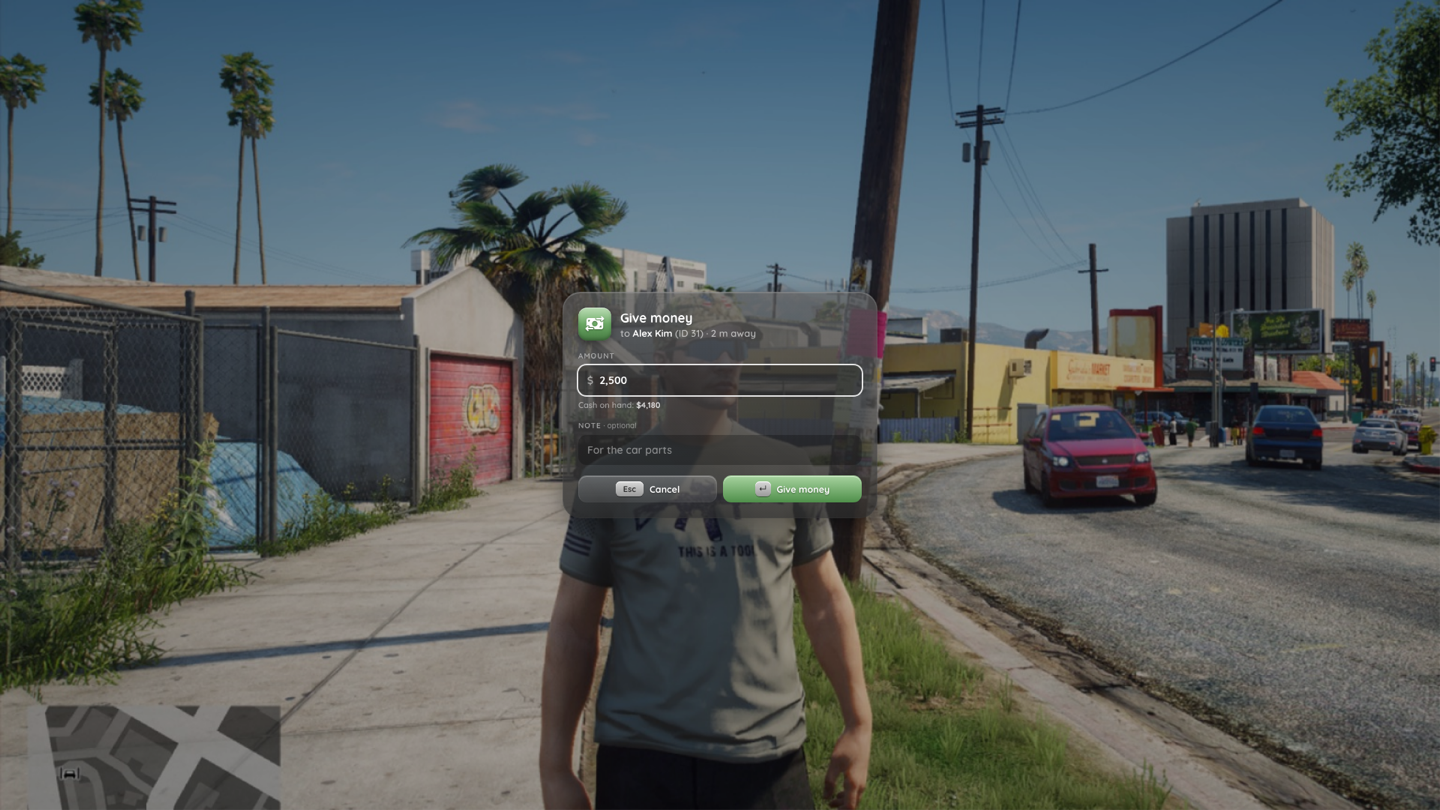
Both dialogs block the calling thread until the player answers. Only one dialog can be open: a second call returns nil / false right away.
local values = exports.np_menu:inputDialog({
  title = 'Create invoice', message = 'Every field is **validated**.', icon = 'file-invoice', tint = 'blue',
  confirmLabel = 'Send invoice',
  fields = {
    { id = 'target', type = 'text', label = 'Recipient', placeholder = 'Name or ID', required = true },
    { id = 'amount', type = 'money', label = 'Amount', min = 1, max = 100000, required = true },
    { id = 'qty', type = 'number', label = 'Quantity', default = 1, min = 1 },
    { id = 'pin', type = 'password', label = 'Account PIN' },
    { id = 'account', type = 'select', label = 'Account', default = 'bank',
      options = { { label = 'Cash', value = 'cash' }, { label = 'Bank', value = 'bank' } } },
    { id = 'colour', type = 'color', label = 'Label colour', default = '#465E8A' },
    { id = 'notes', type = 'textarea', label = 'Notes', maxLength = 500, hint = 'Optional' },
    { id = 'mail', type = 'checkbox', label = 'Send a receipt by mail', default = true },
  },
})
if values then print(values.target, values.amount, values.account) end   -- nil when cancelled

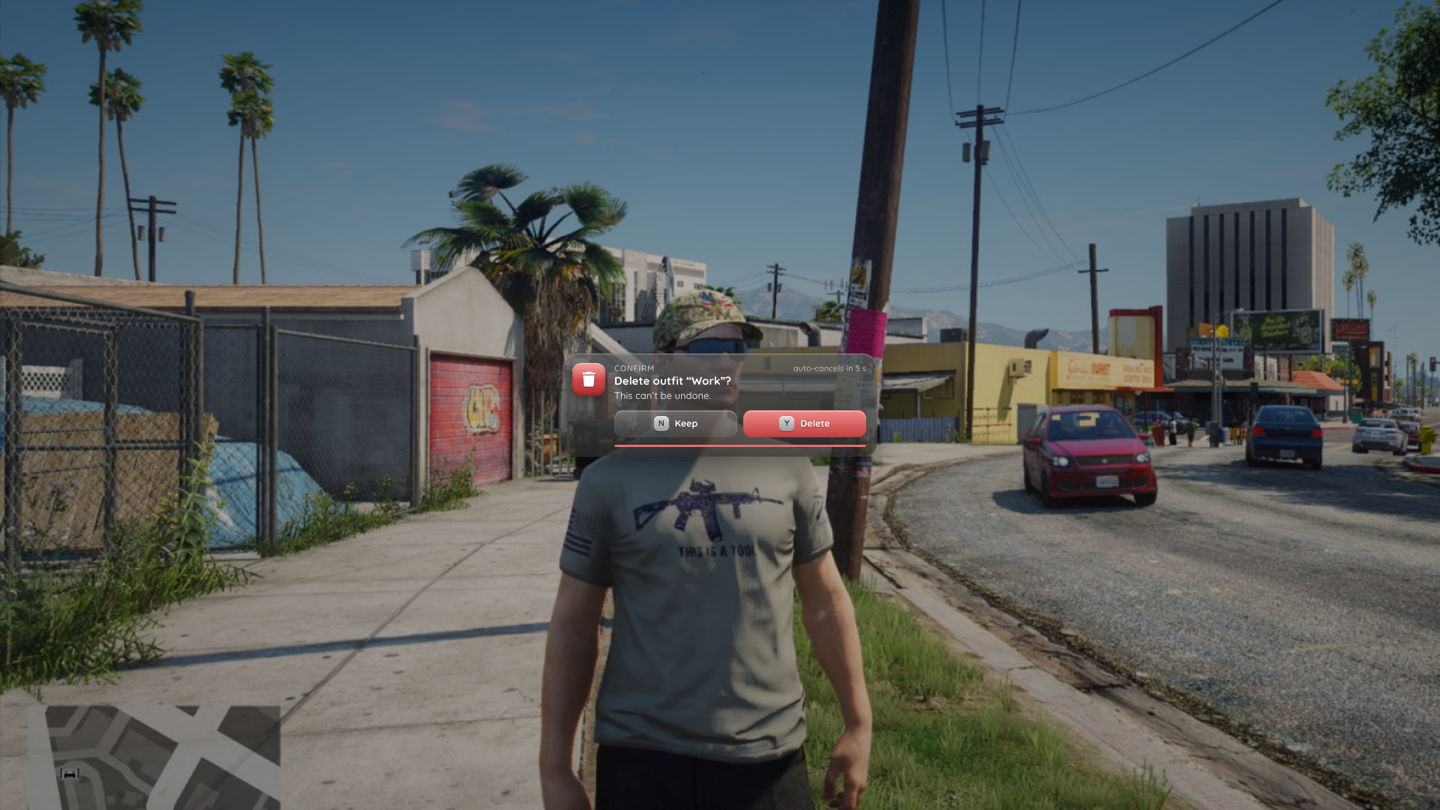
local ok = exports.np_menu:confirm({
  title = 'Delete outfit "Work"?', message = "This can't be undone.", icon = 'trash', tint = 'red',
  variant = 'danger', confirmLabel = 'Delete', cancelLabel = 'Keep',
  timeout = 10000,   -- auto-cancel after 10 s (confirm only)
  hold = 800,        -- hold the confirm button for 800 ms
})
Field types: text, number, money (whole numbers), password, select, checkbox, color, textarea. Lua validates the submitted values again: numbers are clamped to min / max, a select value must be one of the options, and the dialog stays open while a required field is empty. confirm('Are you sure?') also accepts a plain string.
| Input dialog | Confirm |
|---|---|
 |  |
Notifications
exports.np_menu:notify({ type = 'success', title = 'Saved', message = 'Outfit **Work** saved.', icon = 'shirt',
  tint = 'pink', duration = 4000 })
exports.np_menu:notify('Vehicle locked', 'info') -- short form: title, typetype: info, success, warning, error. Optional app sets the small label in the toast head. From the server: exports.np_menu:notify(source, data).
Events
np_menu fires local client events that other resources can listen to:
| Event | Arguments |
|---|---|
np_menu:opened | menuId |
np_menu:closed | rootMenuId, reason |
np_menu:selected | menuId, itemId, value |
np_menu:changed | menuId, itemId, value |
np_menu:radialOpened | sessionId |
np_menu:contextOpened | menuId |
np_menu:contextClosed | menuId, reason |
np_menu:settingChanged | key, value |
AddEventHandler('np_menu:opened', function(id) if id == 'mechanic' then TriggerEvent('my_hud:hide') end end)