
Player settings
F9 opens the settings sheet anywhere, not only in the camera, so a crew can set things up on the ground. It is part of np_helicam's Nimbus UI layer and has three tabs: Settings, Points and Mission. ESC, BACKSPACE or F9 close it.
The sheet is only for players np_helicam concerns: those with the air or ground role, or anyone sitting in a camera heli. For everyone else F9 does nothing, because it is a shared key on many servers. It uses F9 rather than F1 because qb-radialmenu binds F1. If the NUI page hasn't finished loading, the sheet doesn't open and a Not ready toast asks you to try again. ESC always releases the mouse, even if the page lost track of what is open.
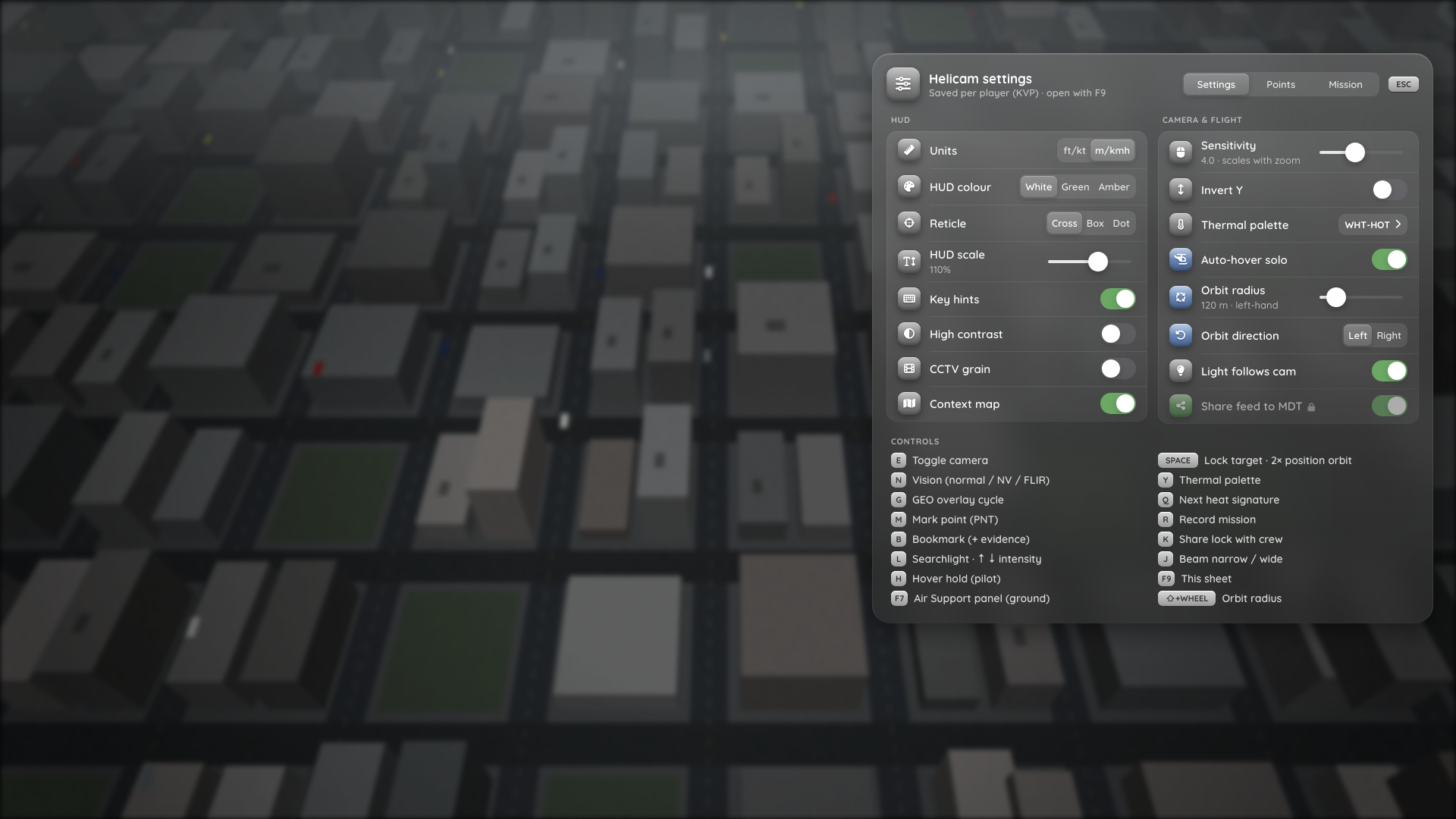
The F9 sheet, rendered in a browser from html/index.html?dev=settings with mock data. In the mock, shareFeed is locked by the server, which is why Share feed to MDT is dimmed with a lock icon.
Settings tab
| Setting | Key | Default | Values | Effect |
|---|---|---|---|---|
| Units | units | 'imperial' | imperial, metric | HUD and panel units: KTS / FT / FPM / MPH or KM/H / M / M/S |
| HUD colour | hudColor | 'white' | keys of Config.Hud.colors | Main HUD colour |
| Reticle | reticle | 'cross' | cross, box, dot | Crosshair style |
| HUD scale | hudScale | 1.0 | 0.8–1.3, step 0.05 | HUD size |
| Key hints | keyHints | true | Key hint row at the bottom of the HUD | |
| High contrast | highContrast | false | Dark backing behind HUD text and labels | |
| CCTV grain | cctv | false | Grainy Config.Camera.timecycle. Applies immediately | |
| Context map | showContextMap | true | Minimap at the top right while the camera is up | |
| Sensitivity | sensitivity | 4.0 | 1–8, step 0.5 | Gimbal speed at the widest zoom. It scales down with zoom |
| Invert Y | invertY | false | Inverts the gimbal's vertical axis | |
| Thermal palette | thermalPalette | 'whitehot' | ids of Config.Thermal.palettes | Also changed with Y in FLIR |
| Auto-hover solo | autoHoverSolo | true | Auto hover when flying solo. Has no effect if Config.Hover.autoEngageSolo is off | |
| Orbit radius | orbitRadius | 120.0 | Config.Orbit.radiusMin–radiusMax, step radiusStep | Also changed with LSHIFT + scroll while orbiting |
| Orbit direction | orbitDirection | 'left' | left, right | Orbit direction |
| Light follows cam | lightFollowsCam | true | Searchlight slaved to the camera (SLAVED) or nose-down (FIXED) | |
| Share feed to MDT | shareFeed | true | Lets ground units see your status and watch your live feed |
Two more settings are not in the sheet: mapFollow (both, heli, me, target) and mapZoom (-3–3) are set by the follow and zoom buttons on the Air Support map and saved like the others.
Below the settings, a Controls list shows every command with the key it is bound to right now (read from FiveM's key mappings, so rebinding shows up here).
Storage
Settings are stored per player, on the player's PC, in the resource KVP np_helicam:settings as JSON. Only values that differ from the server default are saved, so when you change a default in Config.Settings.defaults, it reaches every player who never touched that setting.
Every value is checked when it is set and when it is loaded: unknown keys are ignored, enum values must be in the list, and numbers are clamped to their range. A broken saved value falls back to the default.
Locking settings
The server decides which settings players may change:
Config.Settings = {
  defaults = {
    -- ...
    shareFeed = false,
  },
  locked = { 'shareFeed', 'units' },
}
A locked key always uses its default. Its row is dimmed with a lock icon (Locked by the server), edits are refused, and a saved value for it is ignored. Locking thermalPalette also stops Y from cycling, and locking orbitRadius stops LSHIFT + scroll from changing it.
Some settings also have a server-side switch that wins:
| Server option | Player setting |
|---|---|
Config.Camera.cctvEffect = true | Grain for everyone, regardless of cctv |
Config.Hover.autoEngageSolo = false | No auto hover, regardless of autoHoverSolo |
Points tab
The PNT markers from the server, with label, street, author and time. Players with the air role can rename a marker (label up to Config.Markers.labelMax characters, cleaned by the server) or delete it. The list updates live. See Operations → PNT markers.
Mission tab
The timeline of the current or last mission: Recording · 00:04:12 or Mission timeline · not recording, then one row per event with its time. It refreshes every second while the sheet is open.
Copy report copies the plain-text mission report to the clipboard, ready to paste into an MDT or Discord. See Operations → Mission recording.