
HUD
The camera HUD is drawn with natives every frame (rects, sprites and text from a small set of runtime textures in assets/hud/). It never uses the NUI, so there is no per-frame browser traffic. Every block is optional at runtime: if a module is missing, its value shows as ---- instead of throwing an error.
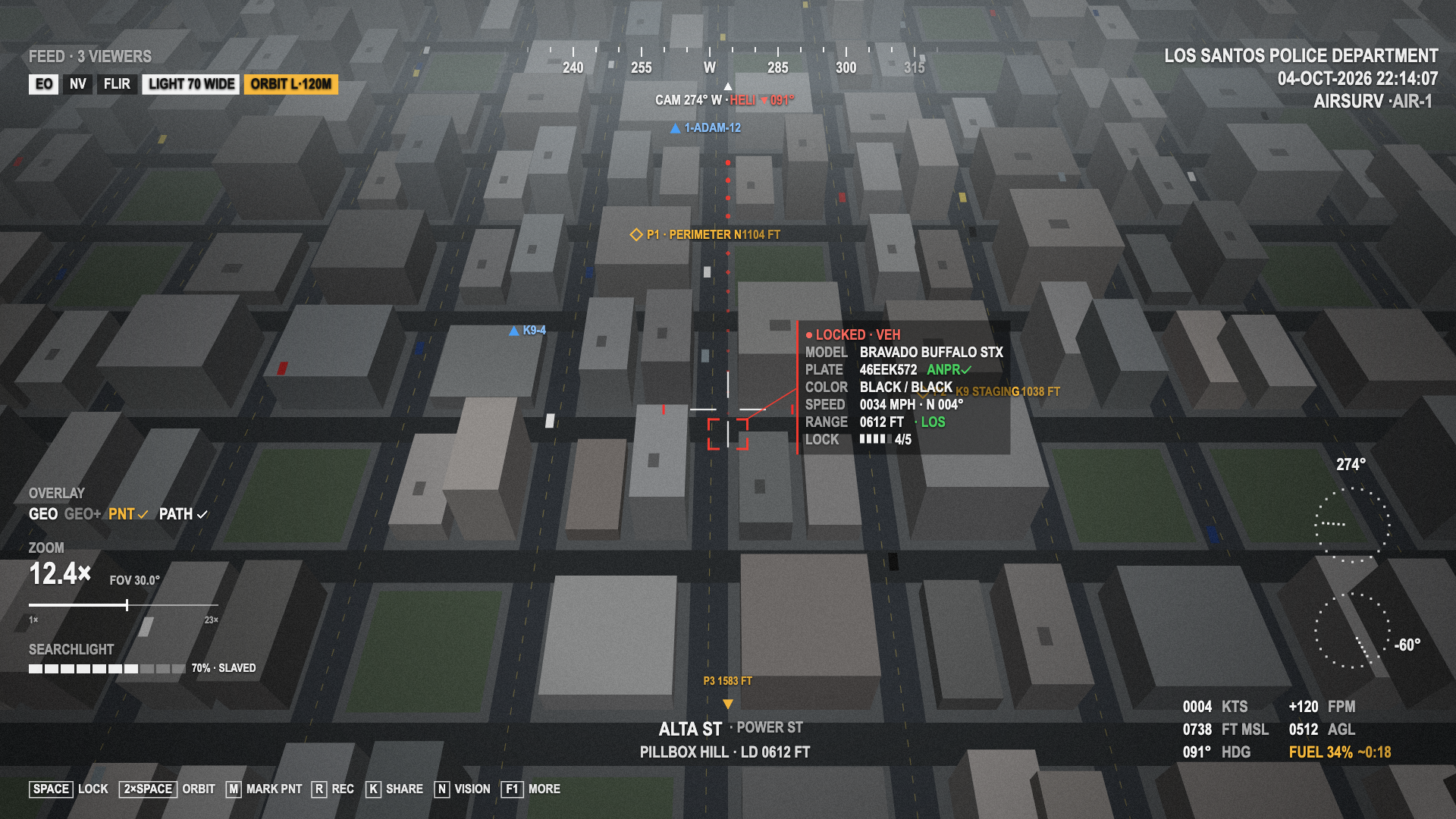
EO mode with a locked vehicle, the orbit running and the searchlight on. Offline replay of the HUD's native draw calls over a mock city background, not an in-game capture. It was rendered before the settings key moved to F9, so the key hint still reads F1 MORE.
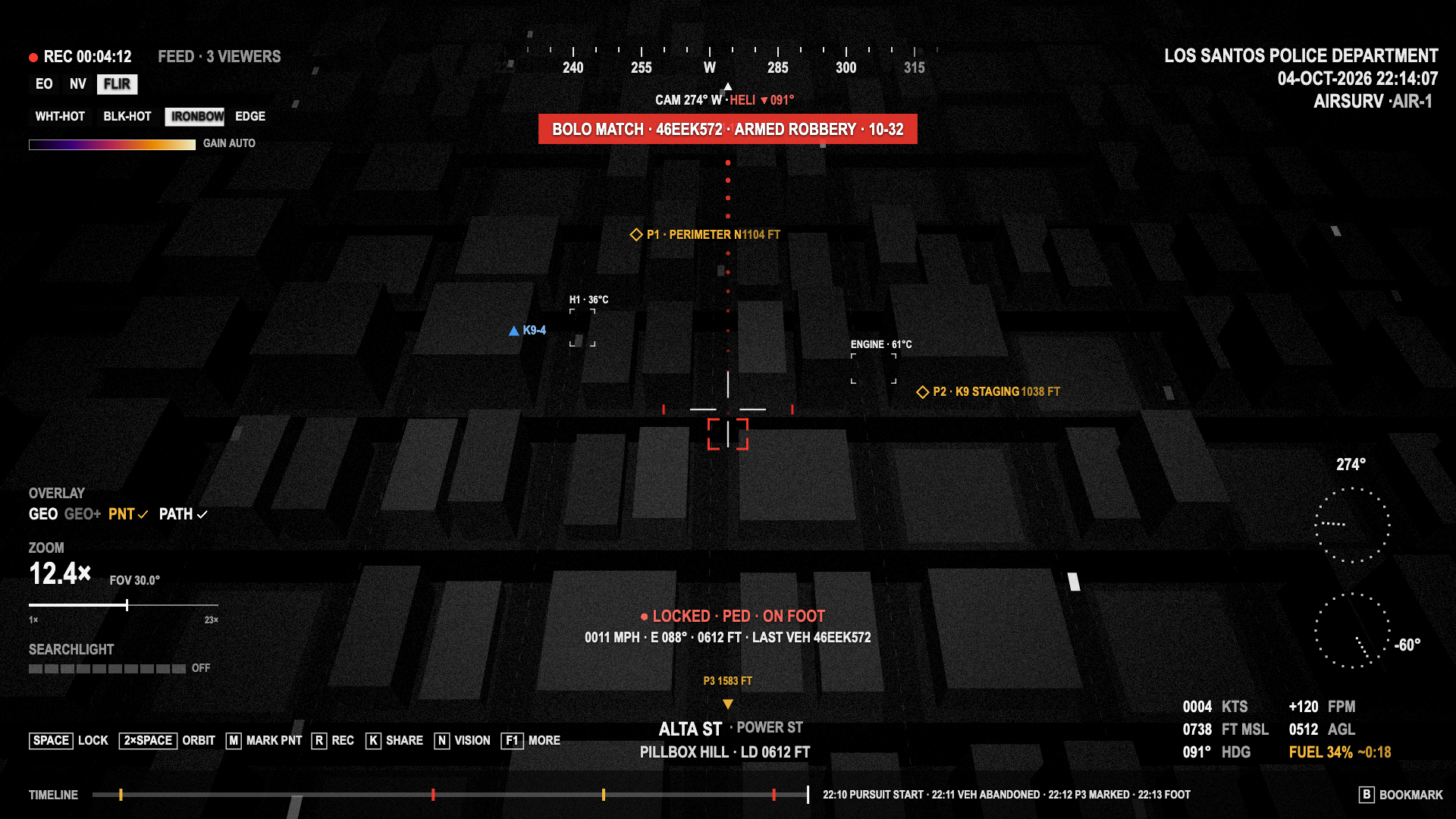
FLIR with the ironbow palette, heat boxes, a BOLO banner, a lock that moved to the driver on foot, and the mission timeline. Same offline replay over a mock background, so the thermal look of the game itself is not shown. The key hint reads F1 MORE for the same reason as above.
Per-player look
The colour, reticle, size and contrast come from each player's settings:
| Setting | Effect |
|---|---|
hudColor | Main HUD colour, one of Config.Hud.colors (white, green, amber) |
reticle | cross, box or dot |
hudScale | 0.8–1.3 |
highContrast | Dark backing behind HUD text and labels |
units | imperial (KTS, FT, FPM, MPH) or metric (KM/H, M, M/S) |
keyHints | The key hint row at the bottom |
Red (locks, BOLO, heli heading), amber (markers, warnings, autopilot pills), blue (friendly units) and green (ANPR, line of sight) keep their meaning in every HUD colour.
Top right: header
Config.Department- Local date and time, e.g.
04-OCT-2026 22:14:07 Config.Callsign· air callsign (AIRSURV · AIR-1)
Top centre: compass tape
- A compass tape for the camera bearing, with a red caret for the heli heading when it is on the tape (
Config.Hud.headingArrow). - Below it:
CAM 274° W · HELI ▲ 091°. The red triangle points from the camera bearing to the heli heading. - A red arrow next to the crosshair also shows the heli's direction of travel as seen in the camera (
Config.Hud.headingArrow).
Top left: recording, feed and pills
● REC 00:04:12with a pulsing red dot while a mission is recording.FEED READY, orFEED · 3 VIEWERSwhen ground units are watching. Only shown while the operator's Share feed setting is on. The count comes from the server-writtenhelicam_viewersbag.- Pills:
EO,NV,FLIR(current one highlighted,FLIR 64%during the warm-up),LIGHT 70 [WIDE] [STROBE],ORBIT L·120MorHOLD, andHOVER. See Controls → Mode pills. - In FLIR: one pill per thermal palette (current one highlighted), a gain ramp and
GAIN AUTO. - During the FLIR warm-up (outside FLIR):
FLIR WARM-UPwith a 10-segment bar.
BOLO banner
A pulsing red banner under the tape: BOLO MATCH · 46EEK572 · ARMED ROBBERY · 10-32. It shows for Config.Bolo.bannerMs (8 s) after an ANPR read hits a BOLO. See Operations → BOLO.
Centre: reticle and target
The reticle (cross, box or dot). Red side ticks appear while something is locked, entity or position.
Locked target: red corner brackets around the target's model bounds, a red leader line, and the target card:
Row Content header ● LOCKED · VEHor● LOCKED · PED · ON FOOTMODELVehicle label ( BRAVADO BUFFALO STX), orPED · M/FPLATEVehicles: the plate with ANPR ✓once read, orREADING...COLORCoarse colour a witness would say: BLACK / BLACKLAST VEHPeds after a lock transfer: the plate of the car they left SPEED0034 MPH · N 004°(withConfig.Hud.showTargetSpeed)RANGE0612 FT · LOS(green), or· NO LOS(amber)LOCKQuality bar, 0–5BOLOCode and reason, in red, after a hit The card sits next to the target and flips to the left near the right edge of the screen.
In FLIR the card is replaced by a compact two-line summary under the reticle, so it doesn't cover the scene:
● LOCKED · PED · ON FOOTand0011 MPH · E 088° · 0612 FT · LAST VEH 46EEK572.
World layers
Drawn under the text blocks:
| Layer | Look | Source |
|---|---|---|
| PATH | Red dots behind the locked target, newest brightest | Trail |
| PNT markers | Amber diamond with P1 · PERIMETER N 1104 FT. Off-screen markers become an amber edge arrow with P3 1583 FT | Markers, max Config.Hud.maxMarkersDrawn |
| Friendly units | Blue triangle with the callsign (1-ADAM-12). Your own crew is left out | Units, max Config.Hud.maxUnitsDrawn |
| Heat boxes (FLIR) | Thin brackets labelled H1 · 36°C (peds) or ENGINE · 61°C (vehicles) | Heat lock |
| GEO / GEO+ labels | Street, junction and zone labels, grid | Controls → GEO overlay |
The temperatures are made up from what the game knows (ped or vehicle, speed, engine on). GTA has no real thermal data.
Left column
OVERLAY:GEO,GEO+,PNT ✓(amber, when markers exist) andPATH ✓(when a trail exists). Inactive entries are dimmed.ZOOM: magnification (12.4×),FOV 30.0°, and a slider from1×to the maximum (23×with the default FOVs).SEARCHLIGHT: a 10-segment LUX bar and70% · SLAVED/FIXED, orOFF.
Bottom centre: street block
The street at the crosshair, the crossing street, the zone and the laser distance: ALTA ST · POWER ST and PILLBOX HILL · LD 0612 FT. It shows with the GEO overlay off too.
Bottom right: flight block and dials
| Left | Right |
|---|---|
Ground speed 0004 KTS | Vertical speed +120 FPM |
Altitude 0738 FT MSL | Height above ground 0512 AGL |
Heading 091° HDG | FUEL 34% ~0:18 |
Fuel turns amber below 35 % and red below 15 %. ~0:18 is the endurance (hours:minutes) from a smoothed burn rate. It appears after about 20 s of flight and stays hidden while the burn rate is near zero. Without a fuel source the field reads FUEL --%. Above the block: the camera heading dial and the camera pitch dial.
Bottom: key hints and timeline
- Key hints:
SPACE LOCK,2×SPACE ORBIT,M MARK PNT,R REC,K SHARE,N VISION,F9 MORE. Turned off with thekeyHintssetting. - Mission timeline (
Config.Hud.timeline, only while recording): a strip along the bottom edge with one tick per event (red for locks, foot transfers and BOLO hits, amber for the rest), the latest events with their wall-clock time, andB BOOKMARK. The key hints move up above it.
Context map
With the Context map setting on, the GTA minimap moves to the top right while the camera is up. It is north-up, the zoom follows the height above ground (Config.ContextMap), and it has blips for the target (red), the aim point (white), PNT markers (orange) and friendly units (blue). Everything is put back when the camera closes: the minimap gets the layout from Config.ContextMap.restore (GTA's default unless you change it), and the client event np_helicam:contextMap fires (true on show, false after the restore) so another HUD can re-apply its own minimap layout.
The context map and the Air Support panel's map share the same radar. If a player with both roles has the panel open while the camera is up, the panel gets the radar and the inset's blips are cleared. The inset comes back when the panel closes. Blip styles are set in Config.Map.blips.
Verify in-game
The top-right placement is computed from the game's default minimap layout and has not been checked in-game yet.
Outside the camera
- With the camera closed, an amber
HOVERpill stays at the top centre while a hover hold is engaged. - A ground unit watching the live feed gets its own small overlay:
LIVE · AIR-1, vision and zoom, the street and zone, a target line andBACKSPACE leave feed.