
Radial & context menus
Radial wheel
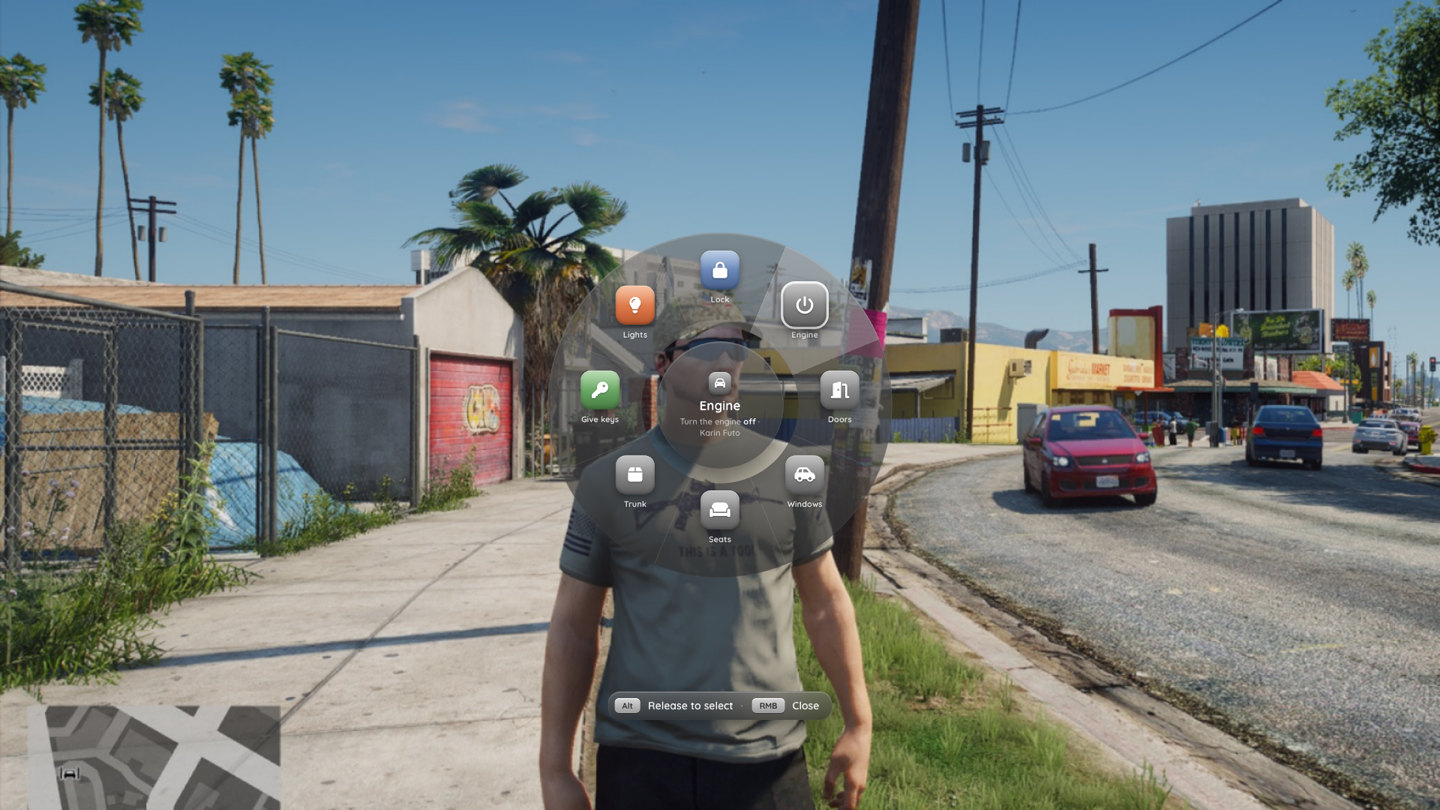
Hold Left Alt (Config.Keys.radial) to open the wheel, aim at a slice and release to run it. Releasing without aiming closes the wheel. Submenu slices open the next ring, which stays open after release and is driven with click, Enter or right mouse (back). The wheel always takes NUI focus while it's open; camera look is disabled.
Adding items
exports.np_menu:addRadial('vehicle', {
  id = 'my_cruise',                 -- optional; the same id replaces an existing item
  label = 'Cruise control', icon = 'gauge', tint = 'blue',
  description = 'Hold the **current speed**.',
  canInteract = function(item, info) return info.vehicle ~= 0 end,
  onSelect = function(item, info) toggleCruise(info.vehicle) end,
})

-- several contexts at once
exports.np_menu:addRadial({ 'onfoot', 'vehicle' }, { id = 'my_phone', label = 'Phone', icon = 'mobile-screen',
  event = 'my_phone:open' })

exports.np_menu:removeRadial('my_cruise')
addRadial(context, item) returns the item id. context is a string or a list of strings; without one the item goes into global.
| Context | When it applies |
|---|---|
global | Always |
vehicle | In a vehicle, or on foot within Config.RadialMenu.nearVehicle (3.5 m) of one |
onfoot | Not in a vehicle |
player | Aiming at another player (camera raycast, rayDistance 6 m) |
ped | Aiming at an NPC |
object | Aiming at an object |
| custom | Any string a provider returns (below) |
Radial item fields
| Field | Description |
|---|---|
id, label, icon, tint, description | As for menu items |
canInteract(item, info), ace, groups, showLocked, visible | Permissions, evaluated when the wheel opens |
onSelect(item, info) | Runs the slice. Return false to skip the event / menu / server steps below |
items or build(info, item) | Submenu ring: a static list, or built when the slice is selected |
menu | Open this registered list / grid menu |
event, serverEvent, args | TriggerEvent(event, args, info) / TriggerServerEvent(serverEvent, args) |
server, args, onResult(ok, data, item, info) | Call a server action with { args = args } |
keepOpen | Don't close the wheel after the pick |
info is { id = 'radial', contexts = { vehicle = true, … }, entity, vehicle, coords }: the aimed entity (or 0), the vehicle you're in or near (or 0) and your coordinates.
A ring shows up to Config.RadialMenu.maxPerRing (8) slices. The rest moves into a More ring.
Custom contexts
exports.np_menu:setRadialContext(function(info)
  if LocalPlayer.state.job == 'police' and LocalPlayer.state.onduty then return 'police' end
  -- or return a list: { 'police', 'emergency' }
end)

exports.np_menu:addRadial('police', { label = 'Cuff', icon = 'handcuffs', server = 'my_police:cuff' })
Several providers can coexist. openRadial(context?) opens the wheel from code, optionally for a single context, and closeRadial() closes it.
Built-in radial items
With Config.Builtin.radial = true, np_menu registers:
- vehicle: lock / unlock, engine, doors (ring), windows (ring), seats (ring), trunk, lights, give keys
- onfoot: emotes, walk style and clothing (open the quick menu's submenus), hands up, point, stop carrying
- player: give money, show ID, carry and escort (
Config.Interact.carry.enabled) - ped: greet / rob placeholders (
Config.Interact.ped.enabled)
Money, ID, keys and carry go through server actions. See Built-in menus.
Context menus
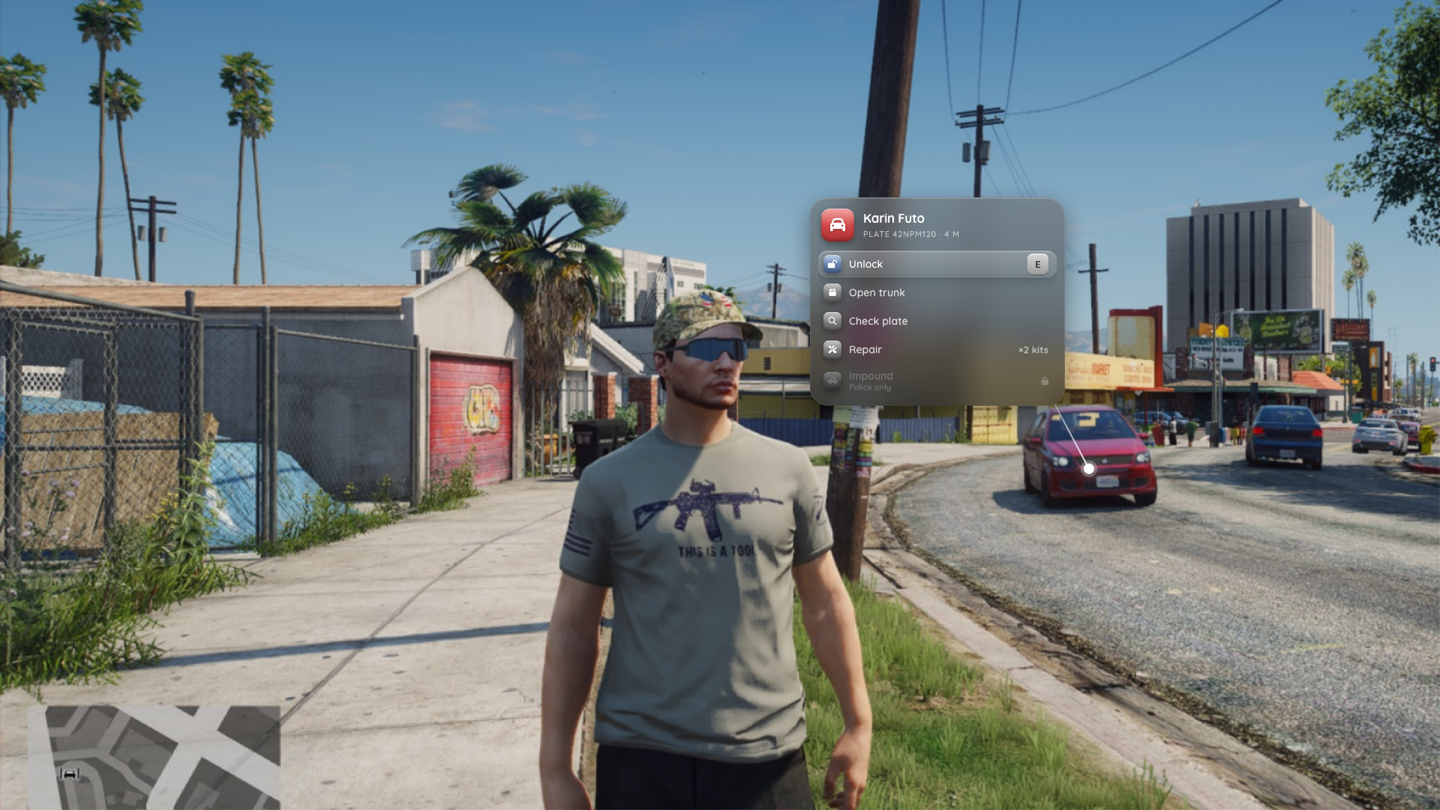
A context menu is a compact list anchored to an entity or a position in the world, with a leader line to it. It follows the target on screen (at most 20 Hz, only when it moved) and closes when the entity is gone or the player walks more than Config.ContextMenu.maxDistance (8 m) away.
showContext
local veh = GetVehiclePedIsIn(PlayerPedId(), true)

exports.np_menu:showContext({
  title = 'Karin Futo', subtitle = 'Plate 42NPM120', icon = 'car', tint = 'red',
  entityLabel = 'Karin Futo',   -- label next to the anchor
  distance = 6.0,               -- auto-close distance (metres)
  offset = 1.0,                 -- z offset on the entity
  items = {
    { type = 'button', label = 'Unlock', icon = 'lock-open', key = 'E', onSelect = function(item, menu)
      SetVehicleDoorsLocked(menu.entity, 1)
    end },
    { type = 'button', label = 'Impound', sublabel = 'Police only', icon = 'truck-pickup',
      groups = 'police', showLocked = true, server = 'my_police:impound' },
  },
}, veh)                         -- an entity handle, or a vector3

exports.np_menu:closeContext()defis a menu definition (registered as a temporary menu) or the id of a registered menu.- Item callbacks get the menu with
menu.entity/menu.coordsset. - Selecting a row closes the context menu unless the row has
keepOpen = trueorclose = false. Submenus open inside the context menu; Backspace goes back, then closes. searchandcounterdefault tofalsehere.- Opening a context menu closes an open list menu and the radial wheel.
addContextOption (built-in "third eye")
The built-in context menu (Config.Builtin.context) works like a target system: hold G, the entity under the crosshair gets an outline, release to open its menu. Other resources add options per entity type:
local id = exports.np_menu:addContextOption('vehicle', {
  label = 'Refuel', icon = 'gas-pump', tint = 'orange',
  models = { 'adder', `t20` },          -- optional model filter (names or hashes)
  distance = 3.0,                        -- optional max distance in metres
  canInteract = function(entity, option) return GetVehicleFuelLevel(entity) < 90.0, 'Tank is full' end,
  showLocked = true,                     -- show disabled with the reason instead of hiding
  onSelect = function(entity, option) refuel(entity) end,
})

exports.np_menu:removeContextOption(id)| Field | Description |
|---|---|
| entity type | 'vehicle', 'player', 'ped', 'object' or 'any' |
label, sublabel, description, icon, tint, badge, variant, hold, confirm, rightLabel, key, keywords | Copied onto the row |
models, distance | Filters |
canInteract(entity, option) | -> bool, reason?. Note the arguments differ from menu items |
onSelect(entity, option) | Runs in its own thread |
event | Alternative: TriggerEvent(event, entity, option.args) |
serverEvent | Alternative: TriggerServerEvent(serverEvent, netId, option.args) |
close | Close after select (default true) |
Options are appended after the built-in ones and removed when the resource that added them stops.
Only with the built-in context menu
addContextOption / removeContextOption are provided by the built-in context menu. With Config.Builtin.context = false they don't exist; use showContext from your own targeting instead.