
Air Support (ground units)
Ground units with the ground role open the Air Support panel with F7. It shows the air units whose camera is up, the real GTA map around the selected one, its status, the PNT markers, and lets the unit ask for an orbit or watch the live camera feed.
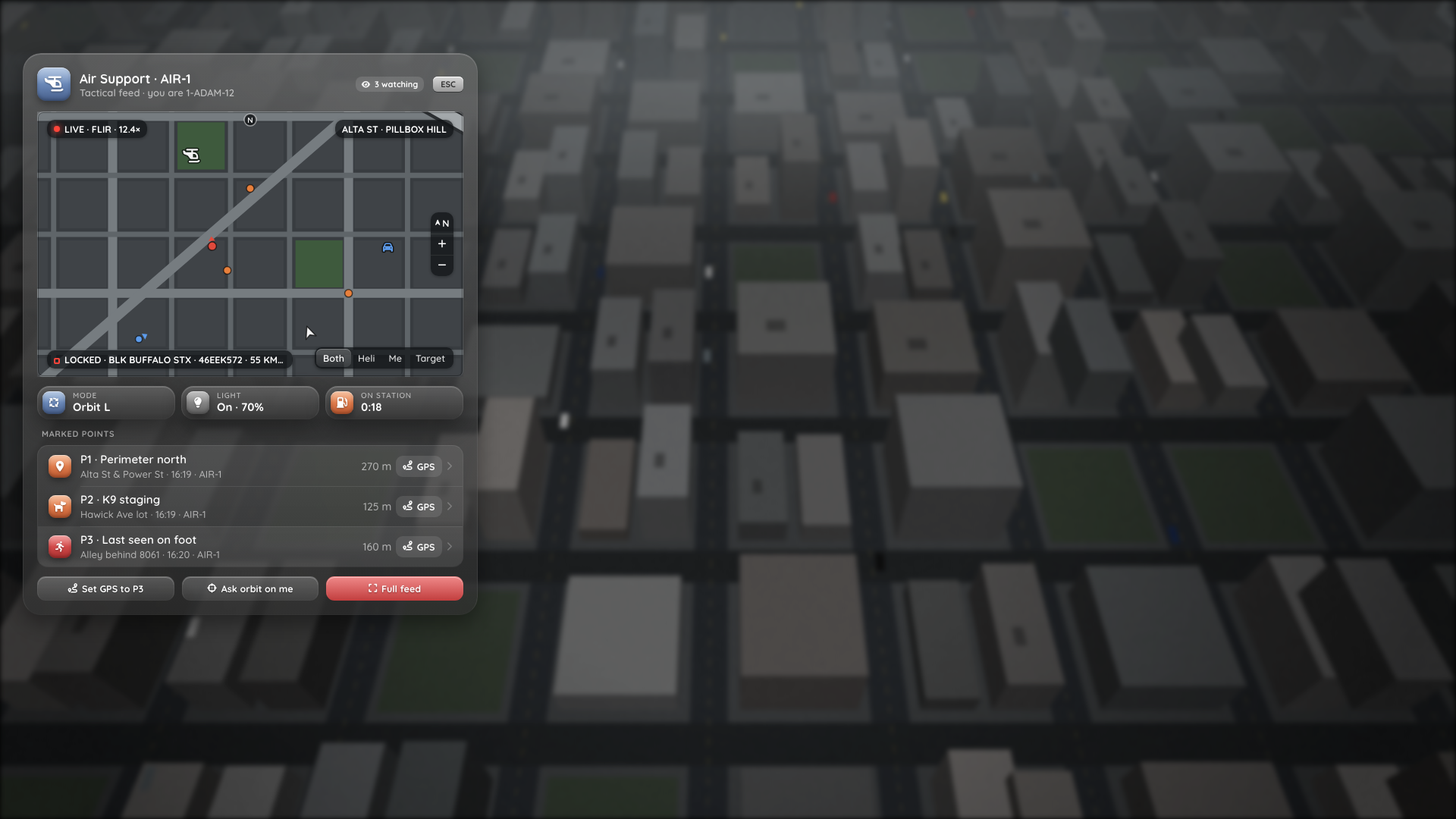
The F7 panel, rendered in a browser from html/index.html?dev=air with mock data over a mock city background. The map in this screenshot is the dev-mode placeholder (a drawn stand-in for the radar). In game, the game's own radar with real blips sits in that window.
Permissions
| Action | Needs |
|---|---|
Open the panel (F7) | ground role. Without it, F7 does nothing (it is a common key, so there is no toast) |
| See markers and units | ground (or air) role |
| Watch the live feed | ground role, your own camera closed, the operator's Share feed setting on, and a free viewer slot |
| Ask for an orbit | ground role, one request per 15 s |
Roles come from Config.Jobs and duty on a framework, or ACE on a standalone server. See Installation → Roles. The server re-checks the role every second while the panel is open. If it is lost (going off duty), the server ends the stream and the panel closes.
If the NUI page hasn't finished loading yet, the panel doesn't open and a Not ready toast asks you to try again.
Where the data comes from
While the panel is open, the client subscribes on the server (air:sub). About once a second, the server pushes the list of every live air unit: helicopters whose operator has the camera up and is still seated, with the server-side position, heading, viewer count and the operator's status. Because the list comes from the server, helicopters outside your streaming range show up too. Nothing the panel shows is in a replicated state bag, so other players in scope can't read the target, plate or aim point. See Events → Air unit status.
The panel
- Header:
Air Support · AIR-1, Tactical feed · you are 1-ADAM-12, and a3 watchingchip with the viewer count.ESC,BACKSPACEorF7closes it. - Air units: every live air unit, sorted by distance (up to 16). The nearest one is selected. With more than one, a switcher shows up to six of them with callsign and distance. Your own heli is left out. With none, the panel says so.
- Map: the game's own radar under a transparent window in the panel, with blips for the heli, the aim point, the locked target, PNT markers and friendly ground units. See Map below. The top bar shows
LIVE · FLIR · 12.4×and the street and zone the camera looks at. The bottom bar shows the lock, e.g.LOCKED · BLK BUFFALO STX · 46EEK572 · 55 KM/H N. - Status chips: Mode (orbit L/R, hover, hold or free), Light (on and LUX), and On station (fuel endurance).
- Marked points: every PNT marker with street, time, author, distance from you and a
GPSbutton. - Actions: Set GPS to P3, Ask orbit on me, Full feed.
The panel data is refreshed twice a second while it is open. Distances follow the viewer's own units setting.
Map
NUI can't draw game textures, so the panel doesn't draw a map itself. It leaves a transparent window and reports its position and size to Lua. Lua then places the game's radar (the minimap) exactly under that window, and the panel's frosted glass leaves a hole there. What you see is the real GTA map, with everything the server streams into the radar: Cayo Perico, map extensions, satellite or postal minimaps. See Map extensions.
North-up, drawn as the exterior map even when you stand in an interior.
Blips are real game blips, shown on the radar only (never on the pause map) and removed when the panel closes:
Blip Default look Heli Police heli sprite, rotates with the heading. Other air units are drawn faded Aim point Small white dot Target Red dot with a heading cone, named after the plate PNT marker Orange dot Orbit request Yellow dot ( ORBIT REQ)Ground unit in a vehicle Blue patrol car Ground unit on foot Blue officer with a heading cone Sprites, colours and sizes are set in
Config.Map.blips. Your own position is the normal player arrow.Follow mode (buttons at the bottom right of the map):
Mode Centre Size Both (default) Fits you, the heli, the aim point and the target As wide as needed, plus fitPaddingHeli The selected heli followHalf(450 m from the centre to the top edge)Me You. The radar follows the player natively followHalfTarget The locked target, else the aim point, else the heli followHalfZoom (
+/−): three steps each way. Each step divides or multiplies the view byzoomStepFactor(1.6), kept betweenminHalfandmaxHalf.The follow mode and zoom are saved per player (settings
mapFollowandmapZoom), so the panel opens the way you left it.The view is recomputed about 4 times a second and the radar slides smoothly to the new centre. A jump of more than
snapDist(1500 m), for example when you select another heli, snaps instead.While the panel owns the radar, its health and armour bars are hidden and the radar's blur plate sits exactly under the map, so nothing spills out beside the panel.
The radar is released when the panel closes, while it is hidden for the live feed, and when no air unit is listed. The minimap then goes back to Config.ContextMap.restore, and the client event np_helicam:contextMap fires. The camera's context map uses the same radar: if one player has both open (air and ground role), the panel wins and the camera inset comes back when the panel closes.
Zoom is calibrated approximately
There is no documented scale for the radar zoom. Config.Map.zoomFit maps zoom levels to metres from community values and eyeballing, so the Both view can be a little tighter or wider than intended. Tune it in game: stand at a junction and compare a known distance with the window. See Configuration → Map.
SVG fallback
With Config.Map.mode = 'svg', the panel draws the abstract tactical map instead: an SVG with you, the heli and its heading, the aim point, the target, PNT markers and ground units, with range rings and a north arrow. There are no follow or zoom buttons, and the radar is never touched.
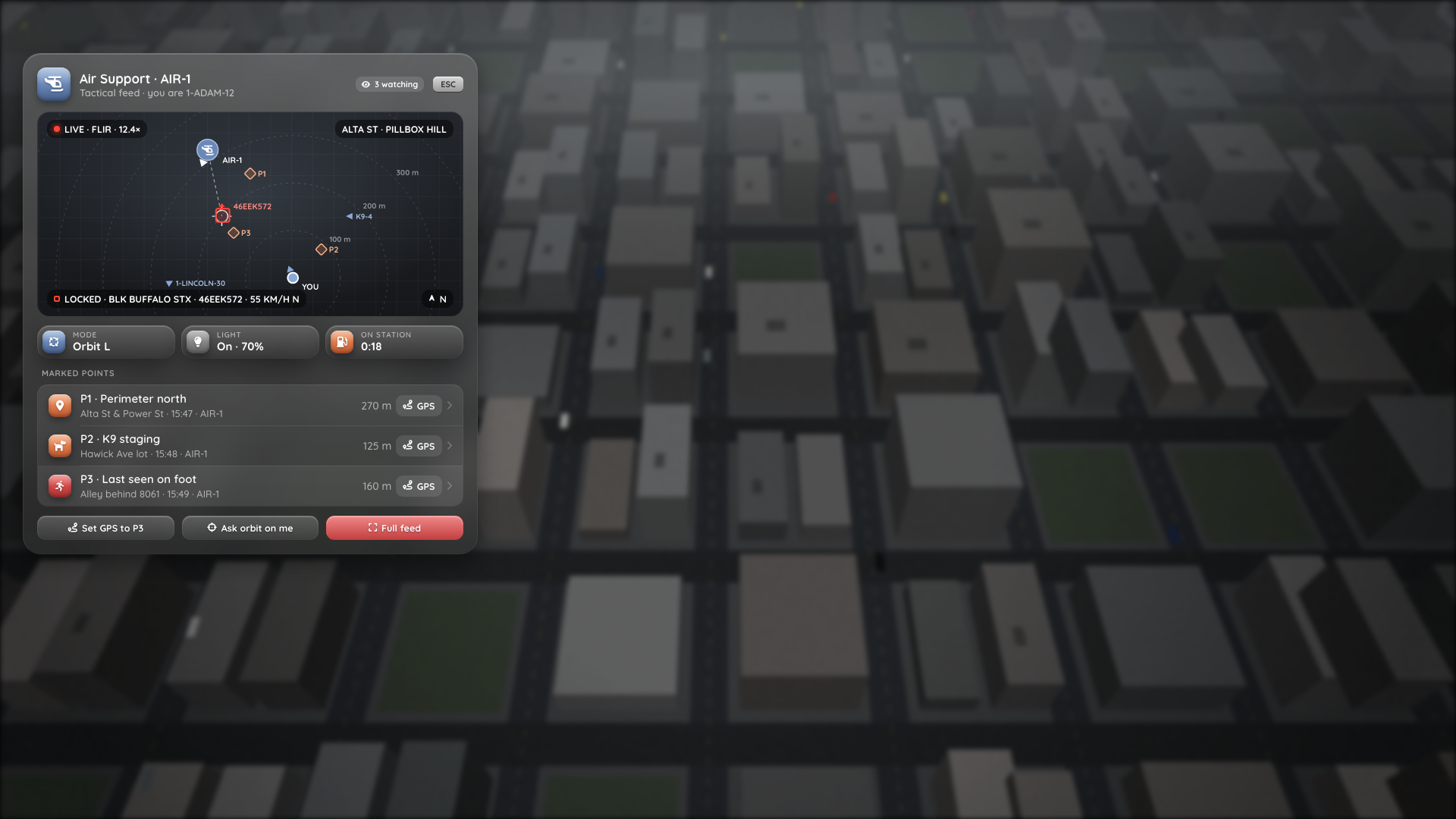
The SVG fallback map, rendered in a browser with mock data.
Map extensions
The panel map and the camera's context map are both the game's radar, so most map additions work without any setup.
Cayo Perico
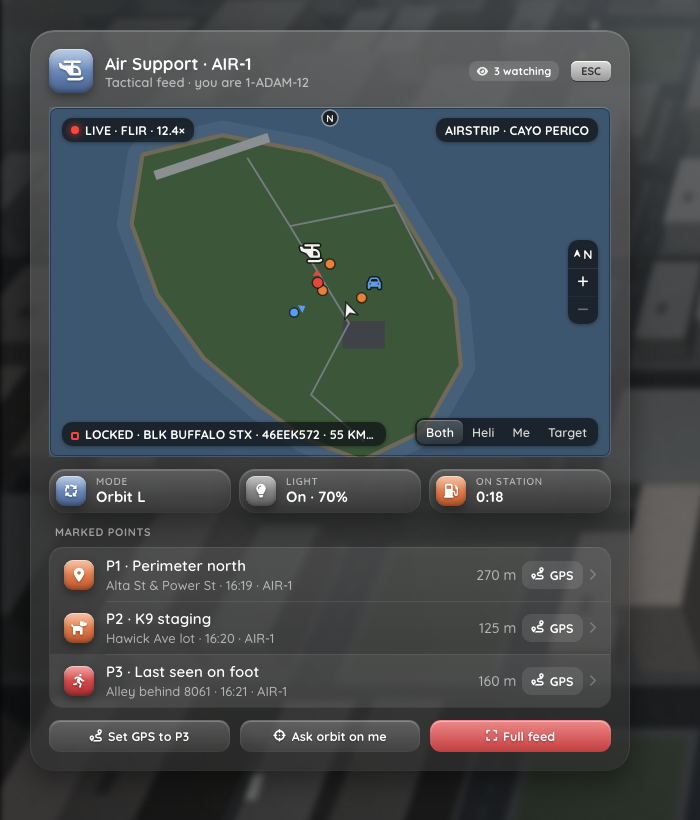
The panel with the scene moved onto Cayo Perico (?dev=air&cayo=1, zoomed out). The map in this screenshot is the dev-mode placeholder. In game, the radar shows the real island map.
GTA only draws the island on the radar when the island map is switched on. Config.Map.cayo controls that:
| Value | Behaviour |
|---|---|
'auto' (default) | Switches the radar to the island map while the radar centre is over the island, and back when it leaves or the radar is released. This also works when you watch a heli over Cayo from Los Santos |
'always' | Like 'auto', but never switches the island map off. For servers that keep it on with another resource |
'off' | Never touches the island map. The heistIsland regions are ignored |
Roxwood County and custom minimap tiles
Map extensions such as Roxwood County, and resources that stream minimap tiles (Extra Map Tiles, minimap_manager, satellite or postal minimaps), need no configuration. Their tiles are part of the exterior radar, so they show up in the panel automatically.
Beyond the vanilla map edge
The radar is centred with LockMinimapPosition, which has no documented clamp to the vanilla map bounds, but this has not been checked in game. If the panel map stops at the old coastline on your server, use the Me follow mode out there: the radar then follows the player natively.
Custom regions
Config.Map.regions is only needed for an extension that ships its own radar interior. Each region is a world box checked against the radar centre. The first match wins:
regions = {
  { name = 'cayo_perico', minX = 3500.0, minY = -6300.0, maxX = 6000.0, maxY = -4000.0,
    interior = 'h4_fake_islandx', ix = 4700.0, iy = -5145.0, heistIsland = true },
  -- { name = 'my_extension', minX = ..., minY = ..., maxX = ..., maxY = ...,
  --   interior = 'my_radar_interior', ix = ..., iy = ... },
},| Field | Meaning |
|---|---|
name | Any label |
minX, minY, maxX, maxY | World bounds (inclusive, either order) |
interior, ix, iy | Interior name or hash and a point in it. While inside, the radar calls SetRadarAsInteriorThisFrame(interior, ix, iy, 0, 0) every frame |
heistIsland | true switches on the island map while inside (subject to Config.Map.cayo) |
config.lua ships a commented Roxwood entry with placeholder bounds as an example. Roxwood itself doesn't need it.
GPS to a marker
GPS on a marker row (or the Set GPS button) sets a waypoint on the marker and shows a toast with its label and street.
Orbit request
Ask orbit on me sends a request to the selected air unit. The server:
- only accepts it for a live air unit
- uses your own position as the server sees it, so a unit can ask "orbit on me", not "orbit anywhere"
- creates a marker
ORBIT REQ · <your callsign>at that position. Each ground unit has one request marker (a new request replaces the old one), at most 4 exist at once, and they never push out a marker the air crew placed. - sends a toast to everyone in that heli:
ORBIT REQUEST · 1-ADAM-12 requests orbit · Alta St (ORBIT REQ · 1-ADAM-12)
The crew still decides whether to fly it. A second request within 15 s is refused with Request already sent, wait a moment.
Live feed
Full feed hides the panel and switches your screen to the operator's camera:
- The server checks your role, that the heli's
helicam_cambag is on and its owner is still anaircrew member in that heli, and that the heli has fewer thanConfig.Feed.maxViewersPerHeli(8) viewers. It then raises the heli's OneSync culling radius toConfig.Feed.cullRadius(1500 m), so the heli stays streamed to you, and updates the viewer count inhelicam_viewers. - Your client creates its own script camera, attached to the heli at
Config.Camera.attachOffset, and follows the operator's gimbal, zoom and vision mode from thehelicam_camstate bag (read at 10 Hz, smoothed every frame). - A small native overlay shows
LIVE · AIR-1, the vision and zoom (FLIR · 12.4×), the street and zone, a target line (LOCKED · BLACK BRAVADO BUFFALO STX · 46EEK572 · 34 MPH) and a centre reticle. The status for this overlay comes with the join reply and then fromnp_helicam:airStatus, which the server sends only to that heli's viewers.
Press BACKSPACE or ESC to leave. The feed also ends when you die, when the heli leaves the area, or when the operator closes the camera, turns sharing off, leaves the seat or loses the role. You get a toast and the panel comes back.
The feed and your own camera exclude each other: Full feed is refused while your camera is open (Close your own camera first), and E does nothing while you watch a feed.
This is not a video stream
FiveM can't stream video or render another player's camera. The viewer's game renders the scene itself, from the heli's position, with the operator's synced camera angle and zoom. What you see is your own client's view of the world (traffic and peds can differ slightly). The operator's HUD is not copied, and searchlights are drawn by your client relative to your own position, so a far-away beam may not show. See Limitations.
The operator sees FEED · N VIEWERS on the HUD. An operator who turns Share feed off in F9 stops sending the camera state, so the server turns helicam_cam off and drops the status. Their heli disappears from the panel and running feeds end. Servers can force it off for everyone with Config.Settings.locked = { 'shareFeed' } and shareFeed = false in the defaults.
Alerts ground units receive
| Toast | When |
|---|---|
AIR-1 · BOLO HIT (red) | An air unit's ANPR read a BOLO plate |
AIR-1 · AIR-1 tracking … (blue) | An operator shared a lock with K |
| Feed ended / unavailable | The live feed stopped or couldn't start |
Markers update in the panel and on the map without a toast.