
Development
Layout
config.lua
fxmanifest.lua
shared/        engine-free logic, loaded on client and server, unit-tested
  mathlib.lua       vectors, angles, slerp, direction quantisation
  hovermath.lua     hover servo, lead anchor, idle drift
  orbitmath.lua     orbit carrot point and chord
  doubletap.lua     single- vs double-tap classifier for SPACE
  labellayout.lua   overlap-free label placement
  lightsync.lua     searchlight send policy + payload pack/unpack (beam, strobe)
  camsync.lua       camera state / status send policy + validating unpack
  units.lua         imperial / metric formatting, compass points
  rpc.lua           request/response over net events, input cleaning, limiters, cooldowns
  missionlog.lua    mission timeline, track, plain-text report
  heat.lua          heat-lock cycling order, display temperatures
  trailmath.lua     breadcrumb buffer for PATH
  mapmath.lua       panel window → minimap layout, radar zoom ↔ metres, follow views, regions, smoothing
client/
  main.lua          eligibility, core key mappings, the main loop, cleanup
  camera.lua        scripted camera, zoom, vision, lock-on
  projection.lua    world-to-screen reconstruction
  overlay.lua       GEO / GEO+ labels and grid
  hud.lua           AIRSURV HUD v2 (native draws)
  hudkit.lua        drawing primitives: text, pills, tape, dials, runtime textures
  thermal.lua       FLIR palettes and warm-up
  target.lua        target info, ANPR, lock transfer, heat signatures
  trail.lua         PATH sampling
  flight.lua        speed, altitude, VSI, fuel and endurance
  radar.lua         single owner of the minimap: prioritized sessions (panel, camera inset), layout,
                    centre / zoom, Cayo Perico and map regions, restore + np_helicam:contextMap
  mapblips.lua      pooled radar-only blips per owner (panel, camera inset)
  contextmap.lua    camera inset: a Radar session at the top right with blips
  markers.lua       PNT markers (client mirror)
  units.lua         friendly unit stream (ref-counted subscription)
  bolo.lua          BOLO check cache and HUD banner
  mission.lua       mission recording, bookmarks
  camsync.lua       sends camera state (≤ 5 Hz) and status (1 Hz) to the server
  crew.lua          K: share lock
  searchlight.lua   searchlight send + render, beam, strobe
  orbit.lua         orbit autopilot
  hover.lua         hover hold
  auth.lua          air / ground role flags from the server
  settings.lua      per-player settings, schema, KVP
  settingsui.lua    F9 sheet
  airsupport.lua    F7 panel, its radar session, follow mode and zoom
  feedview.lua      live feed viewer
  nui.lua           NUI messages, focus, prompt, progress
  notify.lua        toast providers
  util.lua
server/
  bridge.lua        framework detection, roles, seats, callsigns, notify fan-out
  markers.lua       authoritative marker store
  units.lua         unit position broadcast
  bolo.lua          BOLO registry, exports, ANPR check, /bolo
  mission.lua       mission reports, webhook, evidence screenshots
  feed.lua          camera relay (writes helicam_cam), air unit status + list, feed viewers,
                    culling radius, orbit requests, crew share
  main.lua          searchlight relay (writes helicam_light), sweep of stale light / cam bags
html/          Nimbus UI layer (plain HTML/CSS/JS, no build step)
  index.html, app.js, app.css
  vendor/           Nimbus UI tokens and components, Quicksand, Font Awesome (all offline)
  dev/              mock data, a mock city background and a drawn radar placeholder (radar.js)
                    for browser previews
assets/hud/    small PNGs used as runtime textures by the native HUD
tests/         plain Lua tests
The NUI message contract is below.
Tests
The tests use plain Lua 5.4 and don't need a FiveM server. Run them all from the resource root:
for f in tests/*.lua; do lua "$f" || echo "FAIL $f"; done| Test | Covers |
|---|---|
test_projection.lua | World-to-screen reconstruction |
test_labellayout.lua | Overlap-free label placement |
test_doubletap.lua | Single- vs double-tap |
test_orbitmath.lua | Orbit carrot point |
test_hover.lua | Hover servo, lead, drift |
test_searchlight.lua | LightSync send policy, pack / unpack, v1 compatibility, beam and strobe |
test_camsync.lua | CamSync send policy, the gimbal-only helicam_cam payload, and status validation |
test_rpc.lua | The engine-free half of the RPC module: cleanString / plainText sanitising, rate limiter, cooldowns |
test_missionlog.lua | Timeline caps, track, report text |
test_units.lua | Unit formatting |
test_heat.lua | Heat-lock order, temperatures |
test_trail.lua | Breadcrumb buffer |
test_mapmath.lua | Panel window → minimap component layout (incl. ultrawide and safe zone), the top-right inset layout, restore sanitising, zoom ↔ metres, fit and follow views, regions and the Cayo modes, smoothing, session priority |
test_hud_smoke.lua | Stubs every native the HUD uses, then draws the HUD, the feed overlay and the hover flag in many configurations (all modules / none, FLIR, metric, high contrast, each reticle, flipped card). Catches nil errors and bad format arguments, and checks the per-frame draw budget |
Anything that touches the engine (camera, rendering, flight tasks, state bags, the feed viewer, the minimap layout) needs manual testing on a server with two or more clients. For the map, check that the radar lines up with the panel window at a few resolutions and safe-zone sizes, the follow modes and zoom, Cayo Perico, and that the minimap goes back to its layout when the panel and the camera close.
NUI dev mode
The NUI can be opened in a normal browser. Without GetParentResourceName, app.js loads dev/city.js (a mock city background) and dev/mock.js (mock data), and NUI callbacks are logged to the console instead of posted.
html/index.html?dev=all        every panel at once (default)
html/index.html?dev=settings   F9 sheet, Settings tab
html/index.html?dev=points     F9 sheet, Points tab
html/index.html?dev=mission    F9 sheet, Mission tab
html/index.html?dev=air        F7 Air Support panel
html/index.html?dev=airempty   F7 panel with no air units
html/index.html?dev=toasts     toasts, boarding prompt and progress bar
Flags for the Air Support map, added to ?dev=air or ?dev=all:
&cayo=1    the mock scene moved onto Cayo Perico, with the island in the map
&map=svg   the SVG fallback map (Config.Map.mode = 'svg')
&skirt=1   a dark plate around the map window, to check that the panel glass blurs
           everything except the window (the Config.Map.blur = 'scaled' look)
In the browser there is no game radar, so dev/radar.js draws a placeholder under the window: a procedural map in the radar's colours with the blips. In game, the real radar sits there. The follow and zoom buttons work in the preview too.
Serve the html/ folder with any static server (for example npx serve html) and open one of these URLs.
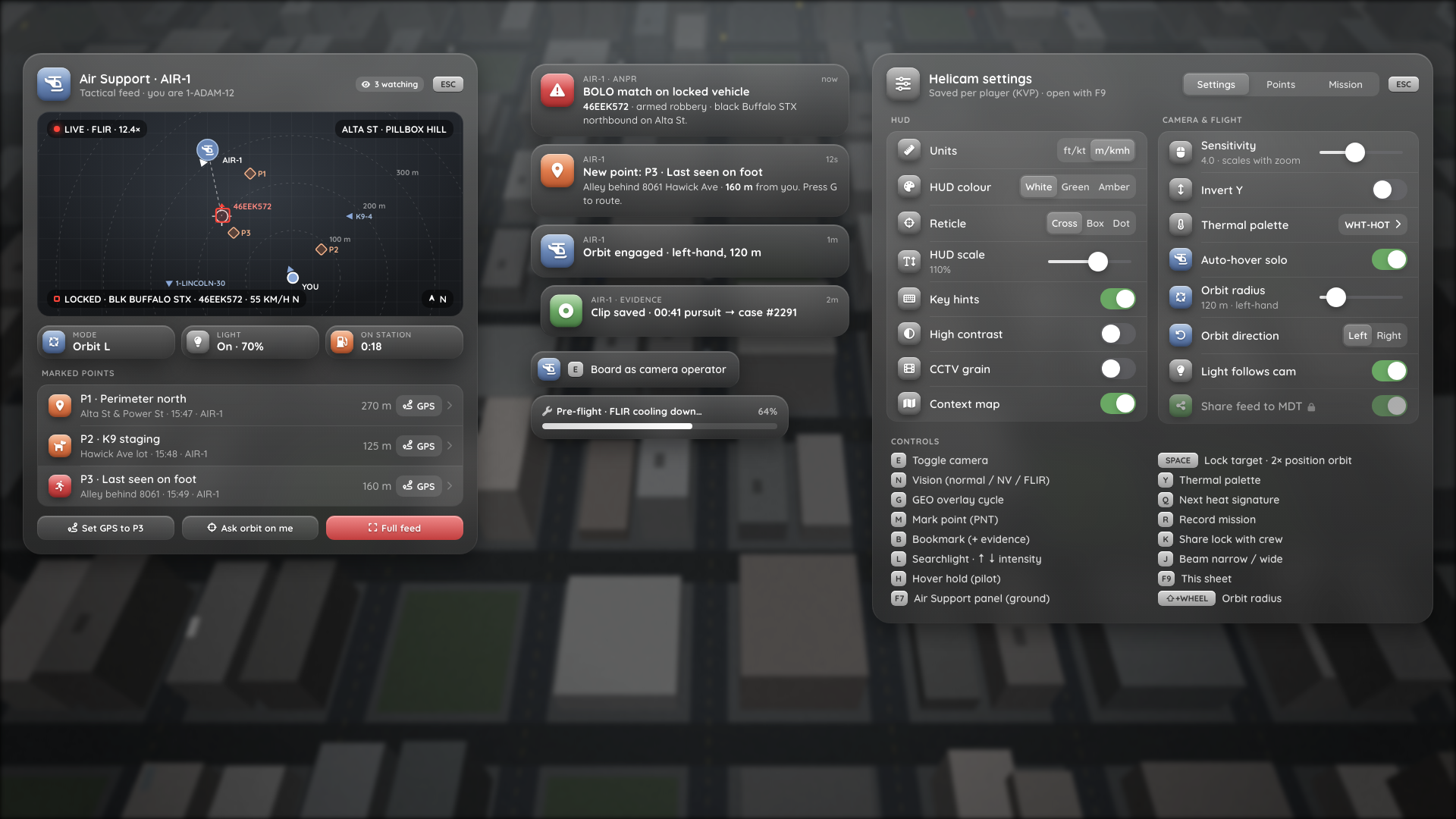
?dev=all: Air Support panel, toasts, boarding prompt, pre-flight progress and the F9 sheet, with mock data. The toast texts come from the mock file and are only examples of the style.
NUI contract
Lua sends SendNUIMessage({ type, data }). The page answers through RegisterNUICallback.
| Message | Data |
|---|---|
notify | { id, tint, icon, app, title, message, ttl } |
prompt | { show, key, text, icon } |
progress | { show, label, pct } |
settings:open / settings:update | { settings, schema, locked, markers, keybinds, mission } (update is partial) |
settings:close | |
air:open / air:update | { units, selected, sys, map: { mode, aspect, follow, zoom } } / { selected, me, heli, aim, target, markers, units, status, viewers, … } |
air:hide / air:close | { hidden } / – |
| Callback | Body |
|---|---|
nui:ready | – → { ok } |
settings:set | { key, value } → { ok, err?, value } |
settings:close | – |
marker:rename / marker:delete | { id, label } / { id } |
mission:copy | – → { text } |
air:select / air:gps | { netId } / { markerId } |
air:mapRect | { x, y, w, h, vw, vh } (map window in viewport CSS px) or { hidden = true } → { ok }. Sent on open, resize, layout changes and hide / show. Lua rejects rects outside the viewport |
air:mapView | { follow, zoom } → { follow, zoom } (what was saved, settings can be locked) |
air:orbit / air:feed / air:close | – |
Nothing that comes from Lua (labels, plates, streets, callsigns) is assigned to innerHTML. Toasts only convert **bold**.
The page posts nui:ready every 500 ms until Lua answers { ok = true }. Until then the F9 sheet and the F7 panel refuse to open, so focus never lands on a page that isn't there. ESC in the page always posts settings:close and air:close, and Lua releases those focus holders unconditionally, so the cursor can't get stuck.
Mockups
The HUD screenshots in these docs are offline replays of the HUD's native draw calls over a mock background, rendered in a browser. They show the layout and content, not the game's own rendering (night vision, the thermal look, fonts at your resolution). See Limitations for what has not been verified in-game.