
np_helicam v2.0.0
An AIRSURV-style police helicopter camera. It has a gimbal-stabilised camera, night vision and FLIR with thermal palettes, a target card with an ANPR plate reader and BOLO checks, heat-signature locking, an LAPD-style orbit autopilot, street labels projected onto the image, synced map markers, a mission recorder, and a searchlight that every player sees. Ground units get an Air Support panel with a tactical map and a live view of the operator's camera.
The camera HUD is drawn with natives, as in v1. v2 adds a small Nimbus UI layer (plain HTML/CSS/JS, no build step) for toasts, the boarding prompt, the F9 settings sheet and the F7 Air Support panel.
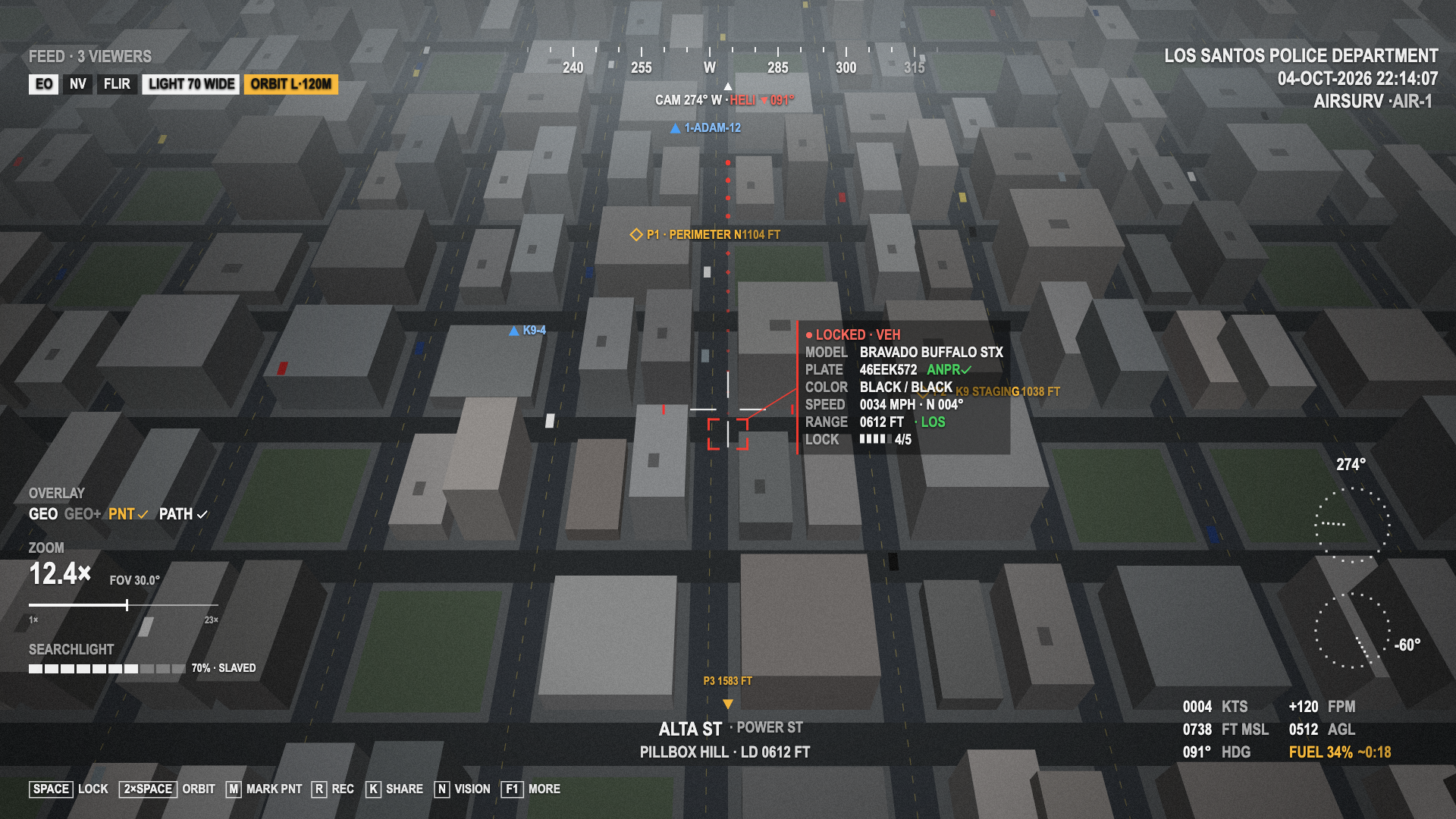
HUD v2 in EO mode: a locked vehicle with its target card, PNT markers, friendly units, the PATH trail, an orbit running and the searchlight on. This is an offline replay of the HUD's native draw calls over a mock city background, not an in-game capture. It was rendered before the settings key moved to F9, so the key hint still reads F1 MORE.
Features
- Gimbal camera: mouse aim, scroll zoom from 70° to 3° FOV (shown as magnification, e.g.
12.4×), and per-player sensitivity and invert Y. - Vision modes (
N): normal → night vision → FLIR. FLIR has a warm-up after the camera opens, andYcycles the thermal palettes (white-hot, black-hot, ironbow, edge). - Target intelligence (
SPACE): corner brackets and a target card with model, plate, colour, speed and direction, range, line of sight and lock quality. After a steady lock the plate is read (ANPR) and checked against the BOLO list. A match shows a red banner. See Operations. - Heat lock (
Q, FLIR): warm peds and running engines are boxed and can be cycled. When the driver of a locked vehicle bails out, the lock moves to the person on foot. - PNT markers (
M): named points at the crosshair, synced to the crew and to ground units. - Friendly units: on-duty officers are drawn in the world with their callsigns.
- PATH: a breadcrumb trail behind the locked target.
- Position orbit: double-tap
SPACEto lock the ground point under the crosshair. As pilot, the heli circles it hands-free. The radius is per player (LSHIFT+ scroll while orbiting). As copilot, the camera holds the point. - Hover hold (
H): a velocity-servo position hold with a slight idle sway. It turns on automatically when a solo pilot opens the camera. - GEO / GEO+ overlay (
G): street, junction (A & B) and zone labels projected with a pure-Lua world-to-screen reconstruction. GEO+ adds a world grid. - HUD v2: compass tape with the heli heading, REC and feed viewers, mode pills, zoom and searchlight blocks, speed / vertical speed, altitude MSL and AGL, fuel endurance, key hints and a mission timeline. Colour, reticle, scale and high contrast are per player. See HUD.
- Context map: the minimap moves to the top right while the camera is up, with blips for the target, aim point, markers and units.
- Synced searchlight (
L,UP/DOWN,Jbeam, strobe): relayed through the server into an entity state bag. It follows the camera, or stays fixed. See Searchlight sync. - Mission recording (
R,Bbookmark): a timeline of locks, markers, BOLO hits and bookmarks with a server-sampled flight track. The report goes to a server event, an export and an optional Discord webhook. Evidence screenshots work whenscreenshot-basicis running. - Crew share (
K): hands the current lock to the other crew member and announces it to ground units. - Air Support panel (
F7, ground units): every active air unit (a server-side list, so helicopters outside your streaming range show too), a tactical map, status chips, the marker list with GPS, "Ask orbit on me", and a live feed that follows the operator's real camera. See Air Support. - Settings sheet (
F9, for players with a role or in a camera heli): per-player settings stored in KVP, marker management, the key list and the mission timeline with "Copy report". See Player settings.
At a glance
- Nothing is required. Framework, fuel, notification and screenshot resources are optional and auto-detected. There is no database and no NUI build step.
- Frameworks: qbx_core, qb-core or es_extended give jobs, duty and callsigns. Without one, the resource runs standalone and uses ACE permissions (by default, everyone has every role, like v1).
- Roles:
airoperates the camera,groundgets the Air Support panel, markers and alerts, andbolomanages the BOLO list (police only by default). The server checks the role on every action. See Installation → Roles. - Who can use the camera: whitelisted helicopter models (
polmav,buzzard2), the pilot and copilot seats, theairrole, plus your own check inConfig.CanUse. - Performance: the HUD is native draws with no per-frame NUI traffic. Heat scanning, overlay lookups, markers and units have per-frame or per-tick budgets. The unit position broadcast only runs while somebody is subscribed.
- Network: more is synced than in v1, and clients write no state bags. The operator sends rate-limited events to the server, which checks the role and seat and writes the searchlight (
helicam_light, at most 10 Hz) and the camera gimbal (helicam_cam, at most 5 Hz) bags itself. The operator's status (target, plate, aim point, fuel) is not replicated: the server pushes it only to ground units with the Air Support panel open and to feed viewers. Markers, units, BOLO checks, mission events, crew shares and orbit requests go through server-validated RPCs. The orbit and hover autopilots are still local. See Events, state bags & commands.
What changed from v1
v1 had no NUI and no framework integration, and only the searchlight was synced. Existing config.lua sections keep their meaning. The new sections are listed in Configuration.
Limitations
Some things the design mockups showed are not possible in FiveM. This is what v2 does instead:
| Idea | Why not | What v2 does |
|---|---|---|
| Wide-angle video picture-in-picture | Script cameras have no second render target | Context map: the real minimap, top right, north-up, zoom following altitude, with blips |
| Live video thumbnail in the ground panel | NUI can't show a game camera | A tactical SVG map in the panel. Full feed renders a script camera on the viewer's client that follows the operator's synced camera state |
Video recording (REC) | No video capture | Mission recording: a timeline and flight track exported as a report, with optional screenshot-basic stills |
| Real thermal palettes | GTA has one thermal renderer | Palettes are presets of the SEETHROUGH_* tuning natives plus an optional timecycle. Black-hot is an approximation |
Not yet verified in-game:
- The thermal palette values (
Config.Thermal.palettes), especially black-hot. - The context map's top-right placement of the minimap.
- The direction of the red heading arrow next to the crosshair, and the angled leader line of the target card.
- The live feed as a whole (spectate camera, culling radius, vision mode on the viewer) needs a test with two or more clients.
Known gap: np_hud moves the minimap itself but has no hook for np_helicam:contextMap yet. After the camera closes, the minimap goes back to Config.ContextMap.restore (GTA's default layout) until np_hud re-applies its own.
The HUD logic is covered by a stubbed-native smoke test, and the NUI was checked in a browser with mock data. See Development.