
Built-in menus
np_menu ships a set of menus built on its own API. They are usable as they are and double as examples. Each one can be switched off.
| Menu | Key / command | Config | Who |
|---|---|---|---|
| Dev / admin | F10 · /devmenu | Config.Builtin.dev | np_menu.admin ace |
| Quick menu | F1 · /quickmenu | Config.Builtin.quick | Everyone |
| Radial interactions | hold Left Alt | Config.Builtin.radial | Everyone |
| Context menu | hold G, release | Config.Builtin.context | Everyone |
| Tuning shop | E in a shop zone (driver seat) | Config.Builtin.shops | Everyone |
| Clothing store | E in a shop zone | Config.Builtin.shops | Everyone |
| Settings | /menusettings or the quick menu | Config.Builtin.settings | Everyone |
Keys are RegisterKeyMapping defaults that players can rebind. The shop camera key is C (Config.Keys.shopCamera).
Disabling
Config.Builtin = {
  dev = true,       -- dev / admin menu (+ its server actions)
  quick = true,     -- F1 quick menu
  radial = true,    -- built-in radial items (the wheel itself and addRadial keep working)
  context = true,   -- "third eye" context menu and addContextOption
  shops = true,     -- tuning shop + clothing store, blips and markers
  settings = true,  -- settings menu (and the quick menu tile)
}
A disabled menu's client and server files return early, so it registers nothing and costs nothing.
Dev / admin
A staff-skinned list menu with deep search. Opening it asks the server whether you hold Config.Admin.ace (cached for 60 s); without it you get a "no permission" toast. Every effect is a server action that checks the ace again.
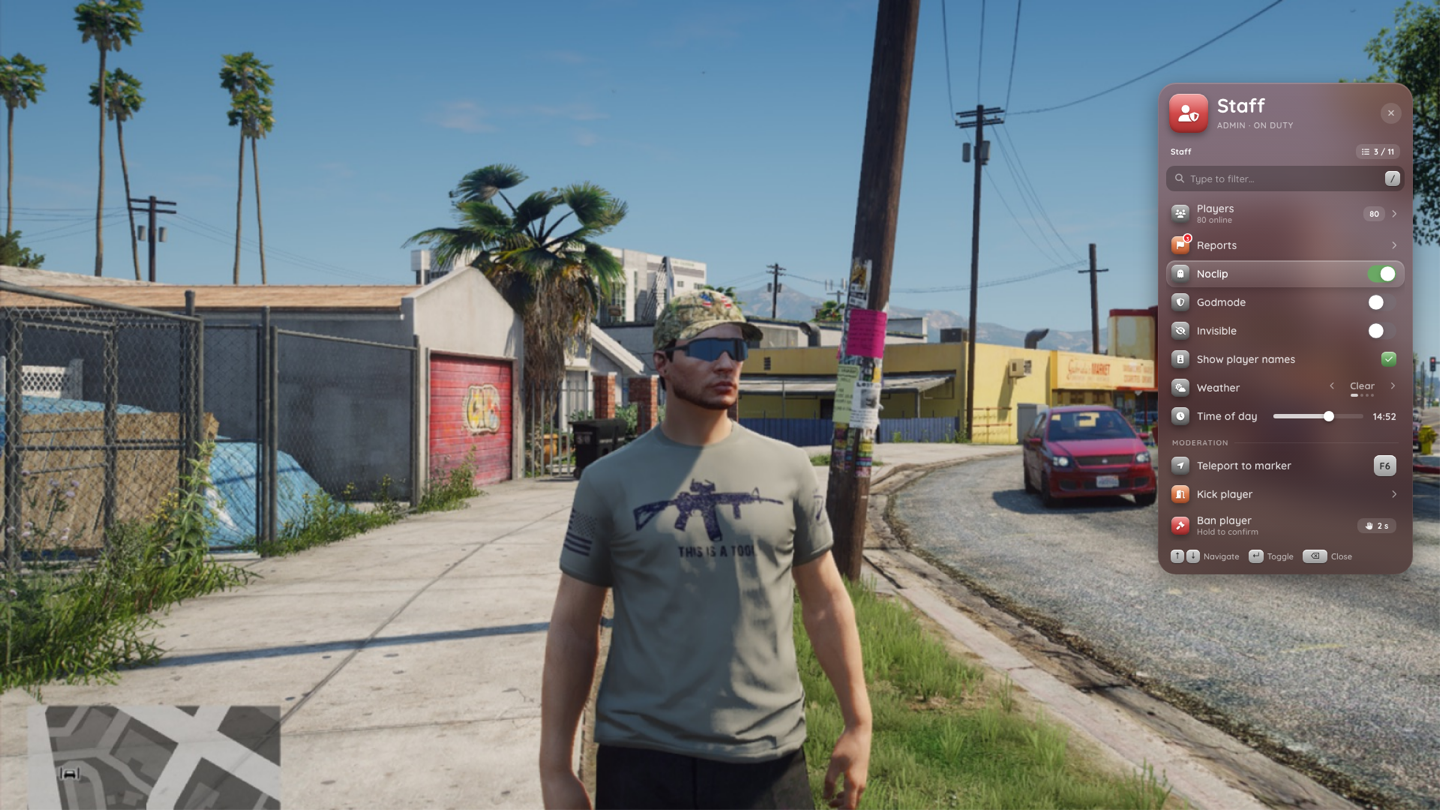
- Self: noclip (with a speed list), godmode, invisible, never wanted
- World: time of day slider (synced for everyone), freeze time, weather
- Tools: teleport to waypoint, copy coordinates (
vector3,vector4, heading) to the clipboard, entity inspector - Vehicle: spawn by model (with recents), repair, clean, flip, max tune, plate, delete (hold to confirm)
- Players: online list with goto, bring, spectate, heal, freeze and kick (with a reason)
- Server info: players, uptime, resources, hostname
Everything the dev menu changed (noclip, godmode, invisibility, frozen clock) is reset when np_menu stops.
Quick menu
The F1 grid: phone home-screen pages with a dock. Hold Y on a tile to pin it to the dock.
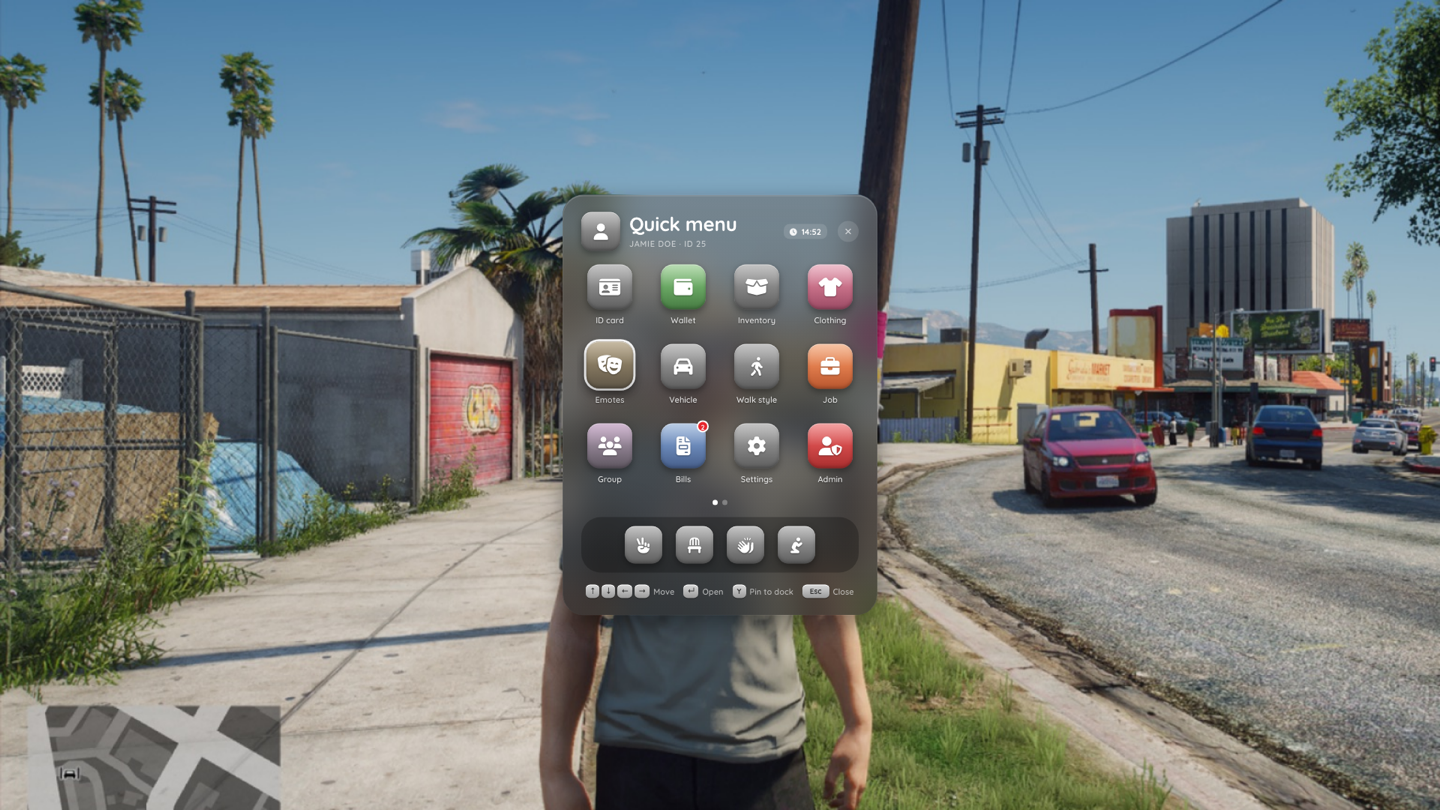
| Tile | What it does |
|---|---|
| ID card | View your ID, or show it to the closest player (server action) |
| Wallet | Cash and bank from the framework |
| Inventory | Fires Config.Quick.inventoryEvent; otherwise opens ox_inventory when it's started; otherwise runs Config.Quick.inventoryCommand (default /inventory) |
| Clothing | Take off / put on hat, glasses, mask, top, pants, shoes, bag and vest, and restore your outfit |
| Emotes | Categories (general, gestures, activities, work, dance) with search |
| Vehicle | Only in a vehicle (locked otherwise): engine, doors, windows, seats, extras |
| Walk style | Pick a walk style (kept across restarts) |
| Job | Job and grade, duty toggle through Config.Quick.dutyEvent / dutyEventServer |
| Bills | Fires Config.Quick.billsEvent, or shows a "not available" toast when it's not set |
| Settings | Opens the settings menu |
| Admin | Opens the dev menu. Only with the admin ace |
See Configuration → Quick menu hooks.
Radial interactions
Items registered with addRadial (see Radial wheel):
| Context | Items |
|---|---|
vehicle | Lock / unlock, engine, doors, windows, seats, trunk, lights, give keys |
onfoot | Emotes, walk style, clothing (open the quick menu's submenus), hands up, point, stop carrying |
player | Give money, show ID, carry, escort |
ped | Greet, rob (placeholders, off by default) |
Locking uses qbx_vehiclekeys / qb-vehiclekeys for the key check when they're started (Config.Interact.lockMode). Give money, show ID, give keys and carry / escort are server actions (np_menu:interact:*) that re-check distances, amounts and money on the server. Carry and escort send a request the target has to accept (Config.Interact.carry.enabled, off by default).
Context menu
Hold G: the entity under the crosshair (Config.Context.distance, 5 m) gets an outline. Release to open its menu.
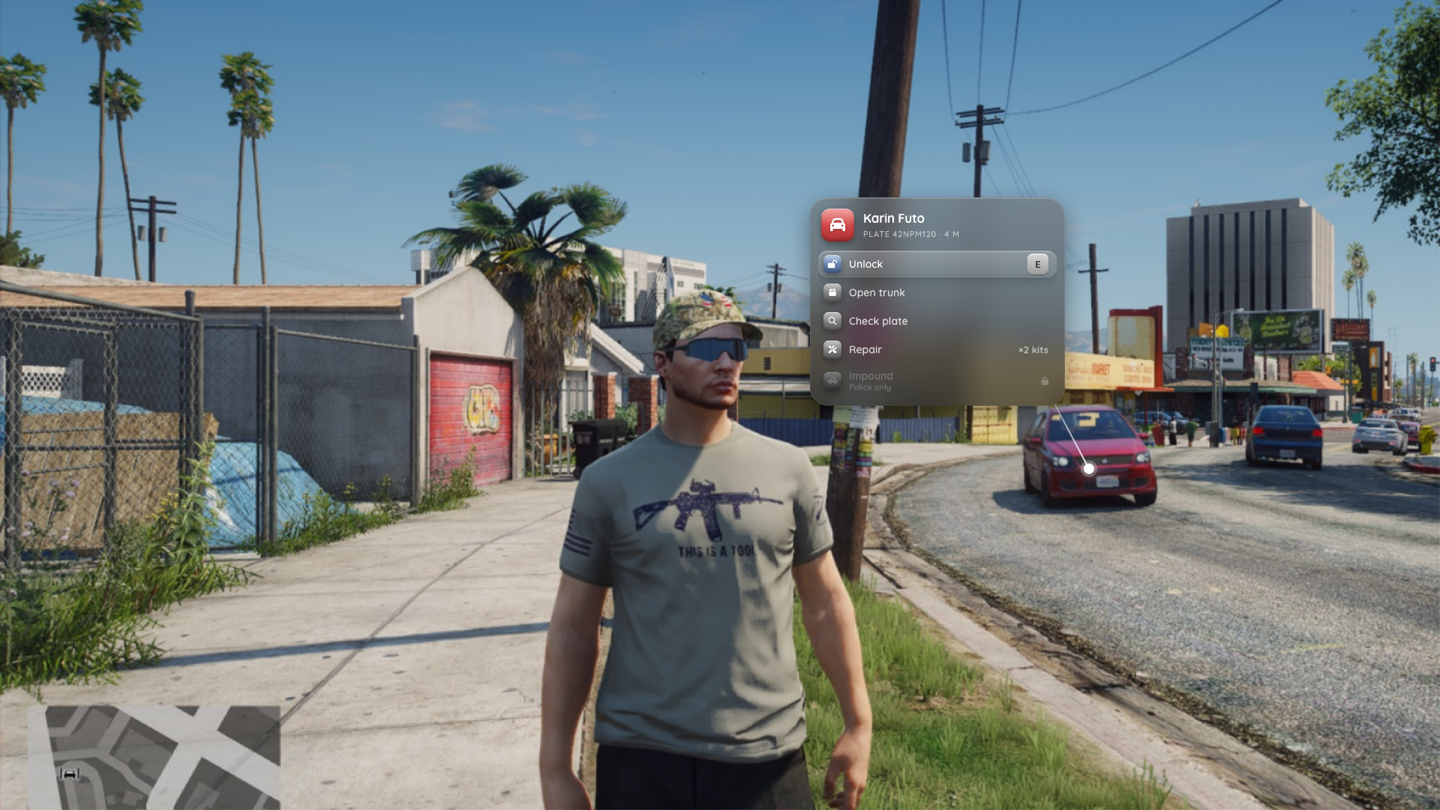
| Entity | Options |
|---|---|
| Vehicle | Lock / unlock, open / close trunk, check plate, repair (needs Config.Context.repair.item, shows the count), impound (Config.Context.impound.jobs, on duty) |
| Player | Give money, show ID, carry, escort |
| Object | "Pick up" placeholder for Config.Context.pickupModels |
Other resources add their own options with addContextOption. The server fires np_menu:interact:impounded (src, plate, model) after an impound so you can persist it.
Tuning shop
Drive into one of the Config.Shops.tuning.locations (Benny's and five LS Customs) and press E in the driver seat.
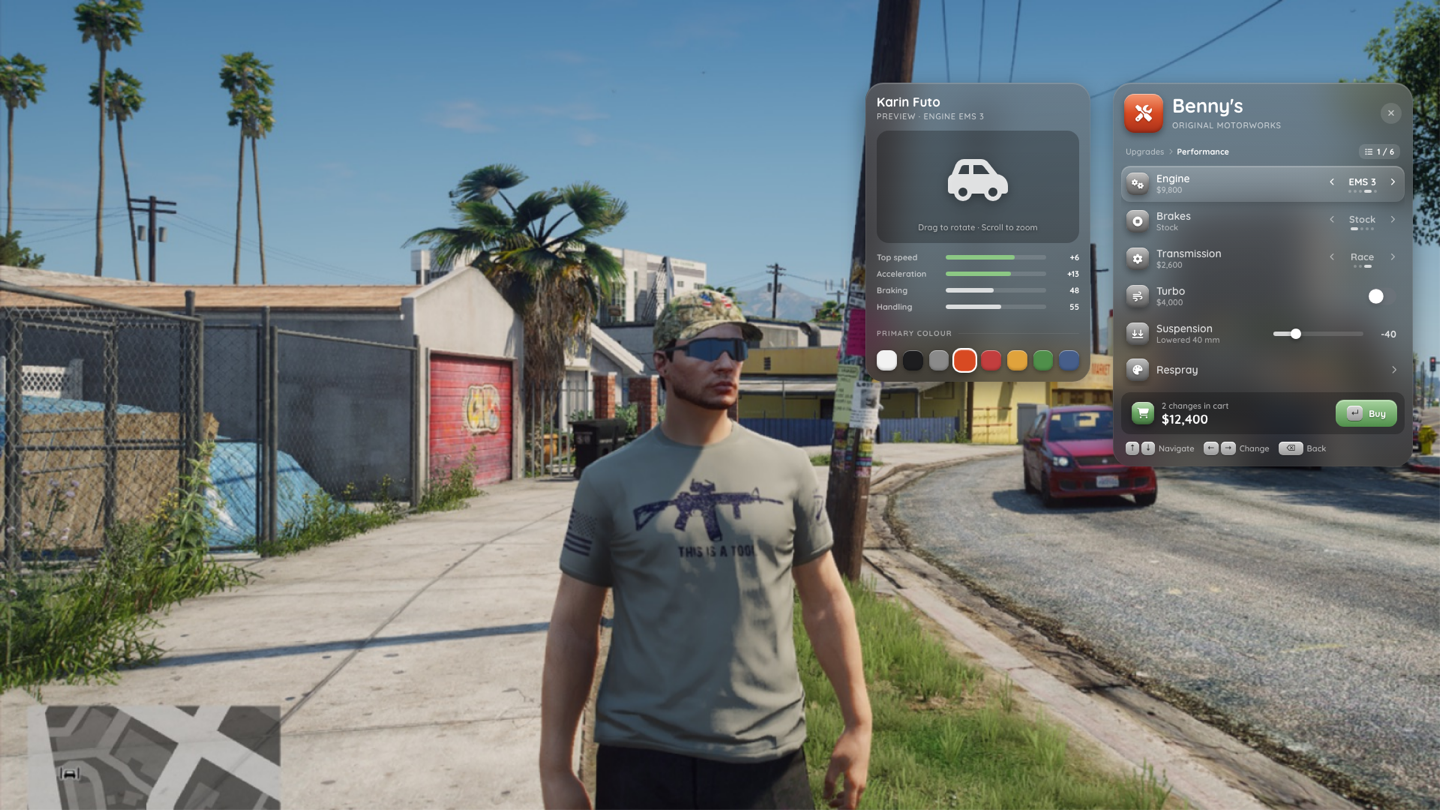
- Categories: performance, cosmetics, wheels, respray, lights, neon
- Every change is previewed live on your vehicle, with a camera preset per category (C cycles) and a stats card
- The cart sums up the changes. Buy sends the list to
np_menu:shops:buyTuning; the server checks you're at the shop, recomputes the price fromConfig.Shops.pricesand chargesConfig.Shops.tuning.account - The original look is restored on cancel, close, death, leaving the vehicle and resource stop
- After a purchase the server fires
np_menu:shops:tuningBought (src, netId, changes, price). Listen to it to persist vehicle props in your garage
Clothing store
Walk into one of the Config.Shops.clothing.locations and press E.
- Drawable and texture rows for every component and prop, previewed on your ped
- Camera presets (face, torso, legs, feet; C cycles) and a rotate slider
- A flat price per changed slot (
Config.Shops.prices.clothing), paid fromConfig.Shops.clothing.account - Saved outfits in client KVP (up to
Config.Shops.clothing.maxOutfits). Applying an outfit in the store puts it in the cart; it's charged through the normal buy - After a purchase the server fires
np_menu:shops:clothingBought (src, changes, price)for your appearance resource
Shops need a framework
The shops charge money through the framework bridge. In standalone mode every purchase with a price fails with "No framework with money support is running".
Settings
See Theming & settings.