
HTTP API
Everything the MDT stores is reachable over a JSON API: for dashboards, spreadsheets, Discord webhooks, or your own game server scripts. This page covers authentication and the most common endpoints.
Full reference
The complete, always-current reference with every route, schema and status code is at mdt.npdev.eu/docs. You can try each endpoint there with your own key. The key stays in the browser tab. The same data is available as OpenAPI 3.1, a Postman collection and llms.txt.
Base URL: https://mdt.npdev.eu/api/v1
Quick start
curl https://mdt.npdev.eu/api/v1/health
# { "ok": true }

curl -H "Authorization: Bearer $KEY" https://mdt.npdev.eu/api/v1/access
# which instance this key belongs to
API keys
Create a key in Discord or in the web board:
- Discord:
/apikey createopens a modal for the key's name, then shows the key once. Copy it right away. Afterwards it can only be deleted. - Web: Einstellungen → Stempeluhr → API-Schlüssel (settings → time clock → API keys).
| Command | What it does |
|---|---|
/apikey create | Create a key. Shown once |
/apikey list | Name, last 4 characters, created and last-used date of each key |
/apikey delete | Delete a key (autocompletes by name) |
Keys are stored only as SHA-256 hashes. Each key belongs to exactly one instance.
Authentication
Send the key as a bearer token:
Authorization: Bearer stmp_your-keyA missing or invalid key returns 401 with { "error": "..." }. The web board uses a Discord session plus an x-guild-id header instead, so a browser never stores a key.
These work without a key: GET /health, GET /docs, the public branding endpoints GET /branding/:guildId and GET /branding/:guildId/icon.png, and /invite.
Scoped keys
Keys created with /apikey create or in the settings have no scopes and full access to their own instance.
A key can instead carry a fixed list of scopes, so a game server gets only what it needs. Scoped keys start with stmp_sc and are created through the API (POST /api/v1/admin/apikeys with { "name", "scopes": [...] }). A key never gains scopes after it was created. The scopes the np_mdt resource uses:
| Scope | Used for |
|---|---|
calls:call.report | Report and resolve calls to dispatch |
calls:read | Read calls (waypoints for assigned units) |
employees:read | Look up who a player is in the MDT |
ranks:personal.ranks_set | Set InGame ranks |
timeclock:shift.ingame_clock | Clock in / out from the game |
units:unit.ingame_status | Set the own unit's status from the game |
facility:queue.ingame_ticket | Queue tickets at an in-game kiosk |
sessions:ingame.tablet_login | One-time login links for the in-game tablet |
facility:hospital.ingame_read · facility:hospital.ingame_layout | Read / place the in-game hospital |
capabilities:read | Let the resource check its own setup at start |
The medic sync routes (/medic/*) accept unscoped keys only.
Statistics
# This week's leaderboard, with charts embedded as base64 PNGs
curl -H "Authorization: Bearer $KEY" \
  "https://mdt.npdev.eu/api/v1/stats/leaderboard?period=weekly&charts=true"

# The bar chart as a PNG file
curl -H "Authorization: Bearer $KEY" \
  "https://mdt.npdev.eu/api/v1/stats/leaderboard/chart/bars.png?period=weekly" -o bars.png

# One user, all time
curl -H "Authorization: Bearer $KEY" \
"https://mdt.npdev.eu/api/v1/stats/user/123456789012345678?period=alltime"| Endpoint | Returns |
|---|---|
GET /stats/leaderboard | Totals, rows per person, trend. limit 1–500, default 10 |
GET /stats/user/:userId | One person's statistics |
GET /stats/leaderboard/chart/:type.png | bars, share or trend |
GET /stats/user/:userId/chart/:type.png | shifts or trend |
period is daily, weekly (default), monthly, alltime or custom (with from / to). date=YYYY-MM-DD picks which day, week or month. All durations are milliseconds (*Ms), timestamps are ISO 8601 in UTC.
{
  "period": "weekly",
  "totals": { "totalMs": 518400000, "totalShifts": 42, "activeCount": 9 },
  "rows": [
    { "userId": "123456789012345678", "badgeNumber": "01", "nickname": "[MD-01] Mustermann",
      "totalMs": 144000000, "shiftCount": 12 }
  ]
}
Time clock
These write data and update the Discord panel immediately. People are addressed by badge (99 or "01"; 01 and 1 are the same badge). Responses always use a two-digit string ("01").
| Endpoint | What it does |
|---|---|
POST /admin/clock-in | Clock in { "badge": 99 }. 404 if no one has the badge, 409 if already clocked in |
POST /admin/clock-out | Clock out { "badge": 99 }. Also clears dispatcher slots and removes the person from all units |
GET /admin/clock-status/:badge | { "badgeNumber", "clockedIn", "status", "since" } |
GET /admin/on-duty | Everyone currently on duty |
curl -X POST -H "Authorization: Bearer $KEY" -H "Content-Type: application/json" \
-d '{ "badge": 99 }' https://mdt.npdev.eu/api/v1/admin/clock-in{ "badgeNumber": "99", "userId": "…", "nickname": "[MD-99] Dr. Pearce",
"clockInAt": "2026-07-25T10:00:00.000Z", "status": "OPEN" }Calls from the game
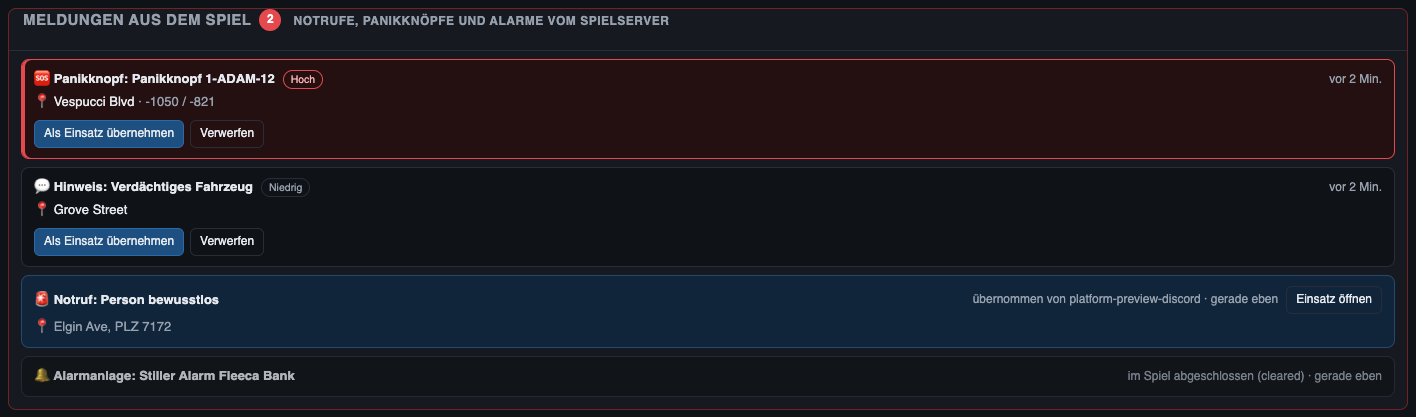
Game servers report emergency calls, panic buttons, alarms and tips. They show up on the dispatch board under Meldungen aus dem Spiel (calls from the game). An incident sheet is only created when a dispatcher takes the call. The np_mdt dispatch module does this for you. Any other script with a key can call it directly.
POST /api/v1/integrations/ingame/calls
Authorization: Bearer stmp_…
Content-Type: application/json

{
  "externalId": "notruf:char1:1696339200",
  "source": "np_mdt",
  "kind": "notruf",
  "priority": 1,
  "title": "Person bewusstlos",
  "message": "Anrufer meldet eine Person am Boden",
  "location": { "x": 215.3, "y": -810.1, "street": "Alta St", "postal": "8025" },
  "caller": { "name": "Max Mustermann", "phone": "555-0123" }
}| Field | Rules |
|---|---|
externalId | Required. A-Z a-z 0-9 . _ : -, at most 80. The same id updates the open call and counts reportCount up |
kind | notruf (emergency call, default), panik (panic), alarm, hinweis (tip) |
priority | 1 high, 2 normal (default, 1 for panik), 3 low |
title / message | Required, ≤ 120 / optional, ≤ 500 |
location | Text, or an object with GTA coordinates x / y, street, postal, text |
caller | Optional name (≤ 60) and phone (≤ 30) |
Resolve a call that was settled in the game with POST /integrations/ingame/calls/:externalId/resolve and { "resolution": "reached" }. At most 200 open calls per instance (429 above that).
Status codes
| Code | Meaning |
|---|---|
400 | Invalid parameter or body |
401 | Missing or invalid API key |
403 | Not allowed (e.g. a scope is missing) |
404 | Unknown route, no data, or the module is switched off |
409 | Conflict (already clocked in, stale version) |
413 | Payload too large |
429 | Too many (e.g. open calls) |